Notes Exporter Pro Logo

Apple Notes Exporter Pro

v2.0.0

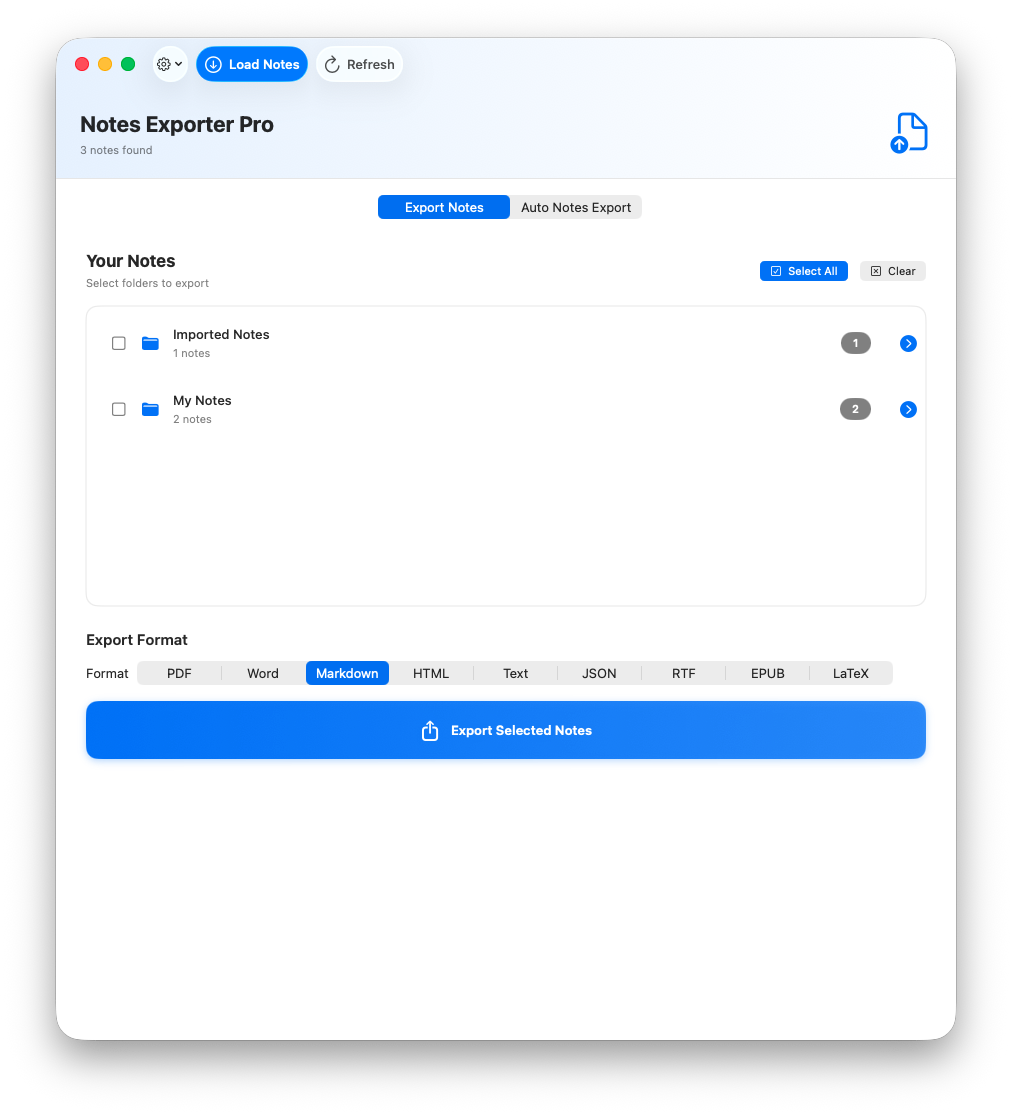
Export Apple Notes on Mac to any format with one click. Preserve attachments, formatting, and folder structure while you batch export notes from Apple Notes to Markdown, PDF, Word, and other formats for backup or migration.

See Notes Exporter Pro in action

4.8/5 user rating

Based on 127 reviews from Apple Notes Exporter Pro users.

Recent Customer Review

April 2026

“Installing and, above all, using Apple Notes Exporter Pro is very user-friendly and intuitive. The Apple Notes were exported in just a few clicks. The customer service and support at 1dot.ai are truly excellent. My enquiry was dealt with very quickly and professionally.”
Karlheinz

Customer Review

August 2026

“This notes exporter app has been super helpful. I take a lot of Apple Notes and the Notes app gets slow after a while, so I need a way to store them elsewhere for safekeeping and future reference. This is the best way to do it, the alternative would be manually exporting 2,500 individual notes one by one.”
Carolyn

Features

Back Up to Your Own S3 Storage
Automatic or manual backups to Amazon S3, Cloudflare R2, Backblaze B2, Wasabi or MinIO
Rich Layout Conversions
Package notes as PDF, Word (DOCX) or EPUB with headings, lists and typography carried across
Structured Data for AI
Export to JSON, JSONL or CSV to turn a notes archive into a dataset for training or prompting a local LLM
Nested Folders Preserved
Every folder and subfolder becomes a real folder in Finder, not one flat dump
Attachments Stay With Their Notes
Images, scans, PDFs, audio and voice notes, and hand-drawn or Apple Pencil sketches all export to an attachments folder beside the note they belong to, not to one shared pile. Sketches and drawings are written as images
Tables, Formatting and Links Intact
Inline tables keep their structure. So do rich text, checklists, bulleted and numbered lists, and links
Auto-Scheduled Exports
Automatically export on a custom daily, weekly, or monthly schedule
Batch Export
Export multiple notes or entire folders at once
100% Private
All processing happens locally on your Mac
Lightning Fast
Export thousands of notes in seconds
Apple Notes Exporter Pro - Export to multiple formats

Export Apple Notes to PDF, Word etc

Export Apple Notes to 15 File Formats

📄
PDF
Portable documents
📝
Word
Microsoft Word
📋
Markdown
Developer friendly
🌐
HTML
Web ready
📃
Text
Plain text
⚡
JSON
Structured data
📄
RTF
Rich text
📖
EPUB
E-book format
📐
LaTeX
Academic writing
🤖
AI/ML Training
JSONL training data
🐘
Evernote (ENEX)
Evernote import
🔮
Obsidian
Obsidian vault
📊
CSV
Spreadsheets
🧩
XML
Structured markup
🗂️
OPML
Outlines

Note: It doesn't support export of password protected notes or password protected attachments.

☁️

Back Up to Your Own Storage

NEW! Automatic and manual backups to S3-compatible storage

Send every export straight to a bucket you own. Schedule it and your Apple Notes back themselves up without you opening the app, or run a backup by hand whenever you want one. Works with Amazon S3, Cloudflare R2, Backblaze B2, Wasabi and MinIO, or anything else that speaks the S3 API.

Auto export to S3
Pair it with a daily, weekly or monthly schedule and backups keep running on their own
Or back up on demand
Back Up via S3 uploads your current selection whenever you ask for it
Your bucket, your rules
Point it at any endpoint, bucket and folder, so versioning and retention stay yours
Test before you trust it
Test Connection checks the endpoint and permissions before the first backup runs
Where your keys live

Notes are exported to your Mac first, then a copy is uploaded to your bucket. Your access key and secret are stored in your Mac's keychain and are used only to talk to your storage provider. They never reach us, and neither do your notes.

🤖

AI/ML Training Export

NEW! Export notes as training data
.jsonlJSON Lines - one JSON object per line

Each note exports 3 training data structures:

Instruction-ResponseLLM instruction tuning (instruction + output)
Prompt-CompletionText completion models (prompt + completion)
Raw DocumentDocument understanding (text + metadata)
Example output:
{"instruction":"Read and understand the following note titled 'Meeting Notes'","input":"","output":"...content...","metadata":{"source":"apple_notes","title":"Meeting Notes",...}}
{"prompt":"# Meeting Notes\n\n","completion":"...content...","source":"apple_notes"}
{"text":"# Meeting Notes\n\n...content...","metadata":{"word_count":150,"char_count":890,...}}
✓Perfect for fine-tuning LLMs, training document understanding models, and building RAG systems

Pricing

Notes Exporter Pro
One-time purchase, lifetime updates
Limited Time OFFER
$99.00$9.99

If your Apple Notes disappeared tomorrow, what would they be worth? A reliable backup is priceless.

Buy Now - PayPal

FAQ

Join our Discord

Get support, share feedback, and connect with other users in our community.

discord.com/invite/7gNv2j7kcf →

Launched On

Launched on LaunchPandaApple Notes Expoter Pro on Nick LaunchesHuzzler Embed BadgeFeatured on SaaSCity
© 2024-2026 Notes Exporter Pro by 1dot.ai