
Press Space on almost anything.
Quick X Folder Preview extends macOS Quick Look with 13 extensions: folders, archives, source code, Markdown, notebooks, data, subtitles, torrents, web archives, ebooks and comics. Each one switchable on its own. Look inside an archive, then take one file out of it without unpacking the rest.
macOS 13.0 or later · Apple notarized · 14-day free trial
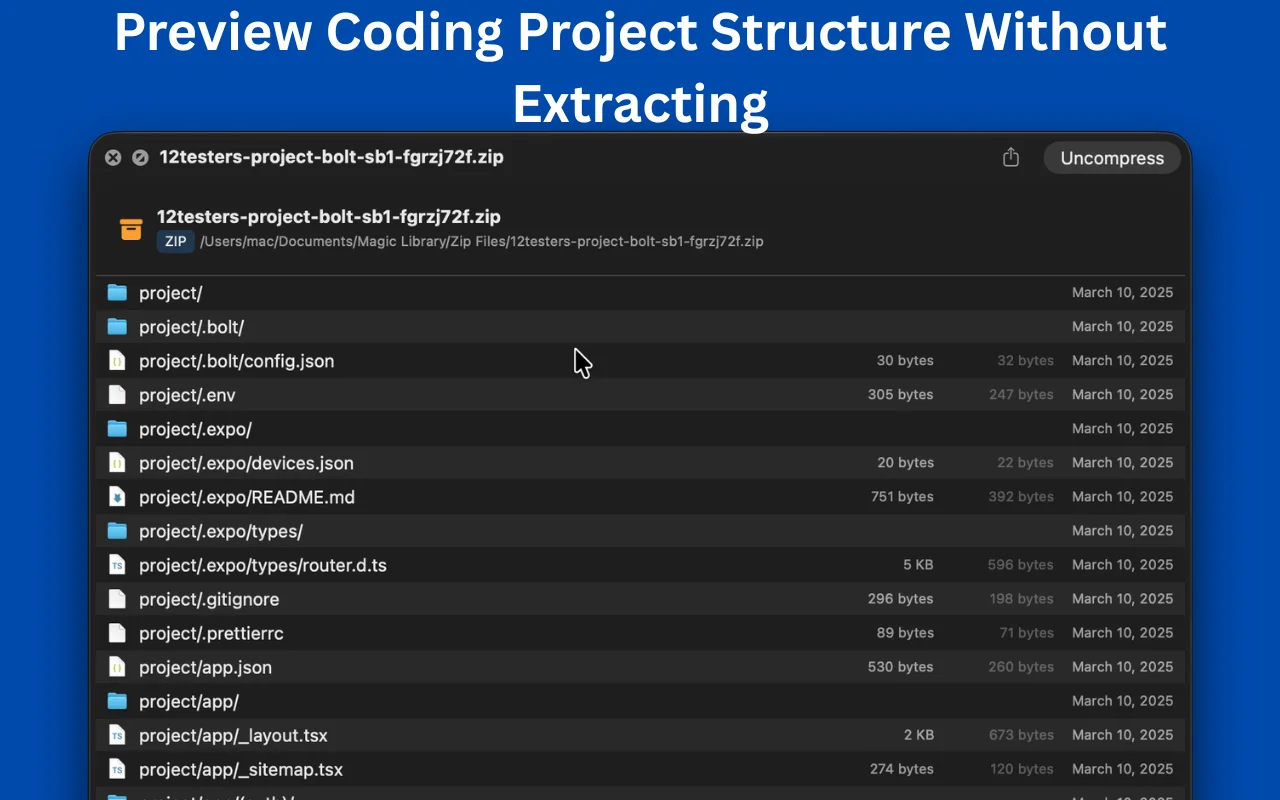
Pull one file out of an archive, and leave the rest packed
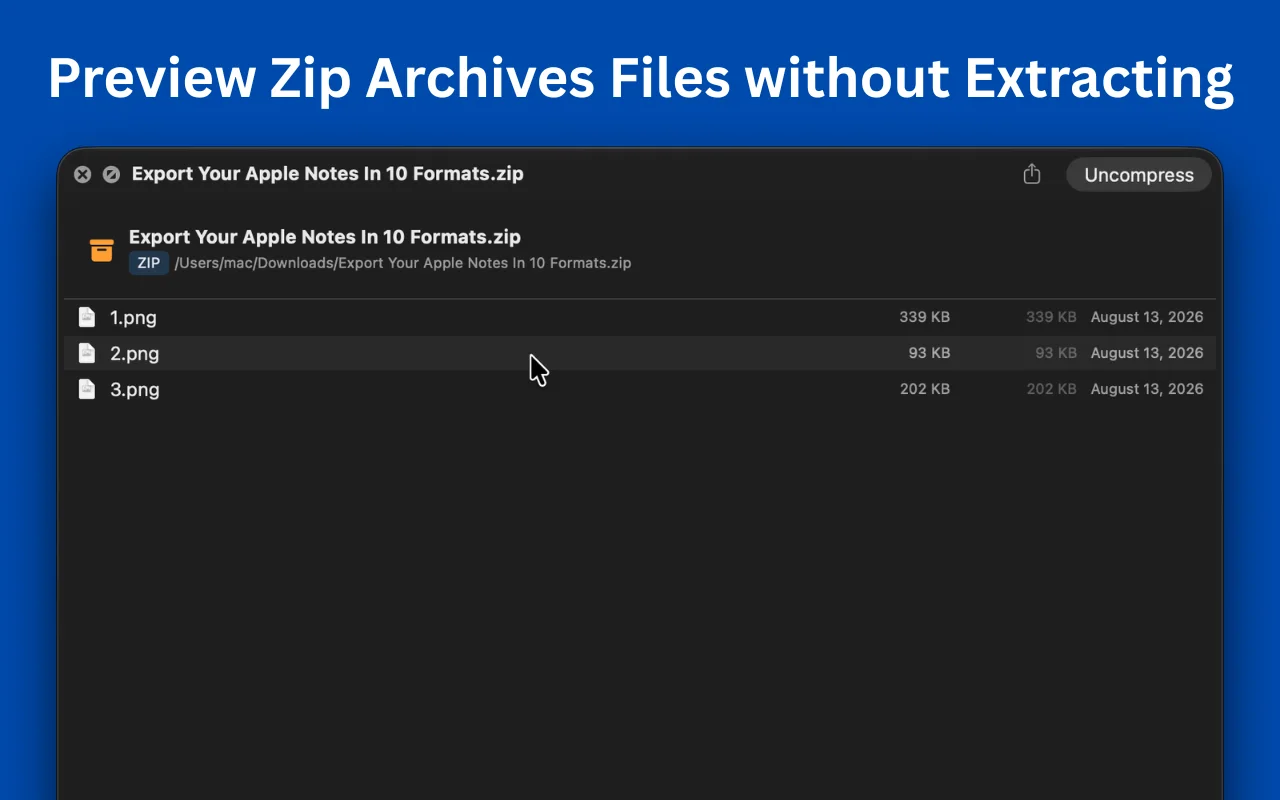
- Get one file out of an archive without unpacking it. Select a file inside a ZIP, RAR, 7Z or TAR preview and choose Copy, then paste it in Finder, on the Desktop, anywhere. Or choose Extract Selected… to send it to a folder you pick. Only that one file is unpacked, however big the archive is.
- Open archives in the app. Press ⌘O, use Finder's Open With, or drop an archive on the window. Each archive gets its own window with a breadcrumb, a filter and sortable columns, and you can drag files straight out to the Desktop.
- Extract to Downloads in one click. For when you do not want to pick a folder.
Earlier updates
- 1.5
- When the trial ends, the app says so. A window explains that previews have stopped and offers the lifetime license, even if the app was sitting in the background.
- 1.4
- No more keychain password prompts, because the license now lives with the app's own settings. Updates found in the background appear in the main window instead of hiding in a menu.
- 1.3
- The lifetime price and a buy button in the app. The setup panel disappears once the first preview works, and the extension list folds away once you are set up.
- 1.2
- 11 new previews (source code, plain text, Markdown, Jupyter notebooks, LaTeX, CSV/TSV, subtitles, torrents, web archives, ebooks and comics), open files inside archives, filter as you type, show hidden files, a Native layout, .app bundles, XZ archives, live reload, and the 14-day free trial.
Everything Quick Look leaves out
Finder already previews files. Quick X Folder Preview adds 13 more Quick Look extensions on top, each one switchable on its own.
Look inside folders without opening them
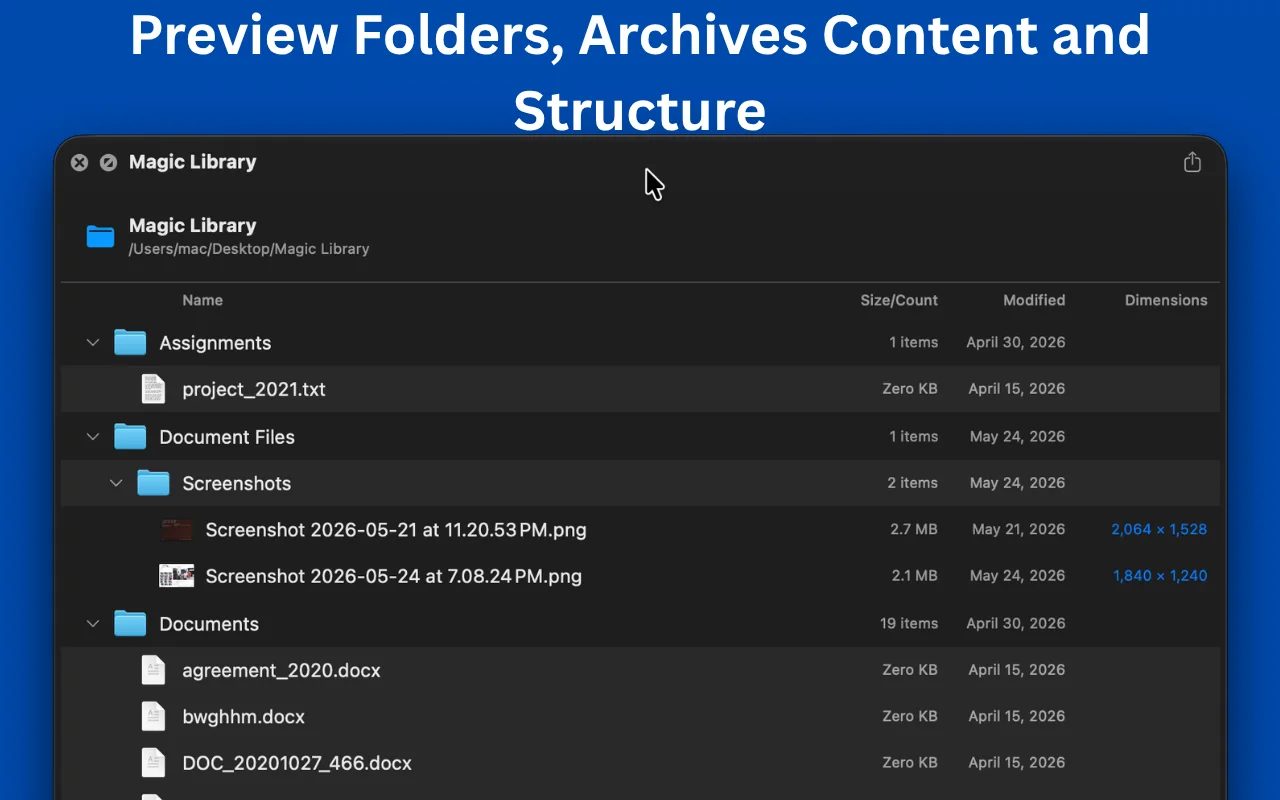
Select a folder or .app bundle in Finder, press Space, and see what is in it: names, sizes, and dates. No new window, no digging through nested folders.
Preview archives without extracting
Look inside a ZIP, RAR, 7Z, TAR or XZ before you unpack it. Filter the file list, and double-click any file inside to open or Quick Look just that one, no need to extract the whole archive.
Find it fast
Type in the filter field to narrow a folder or archive to matching names. Subfolders that contain a match stay visible, so you keep the context.
Image thumbnails, not just file names
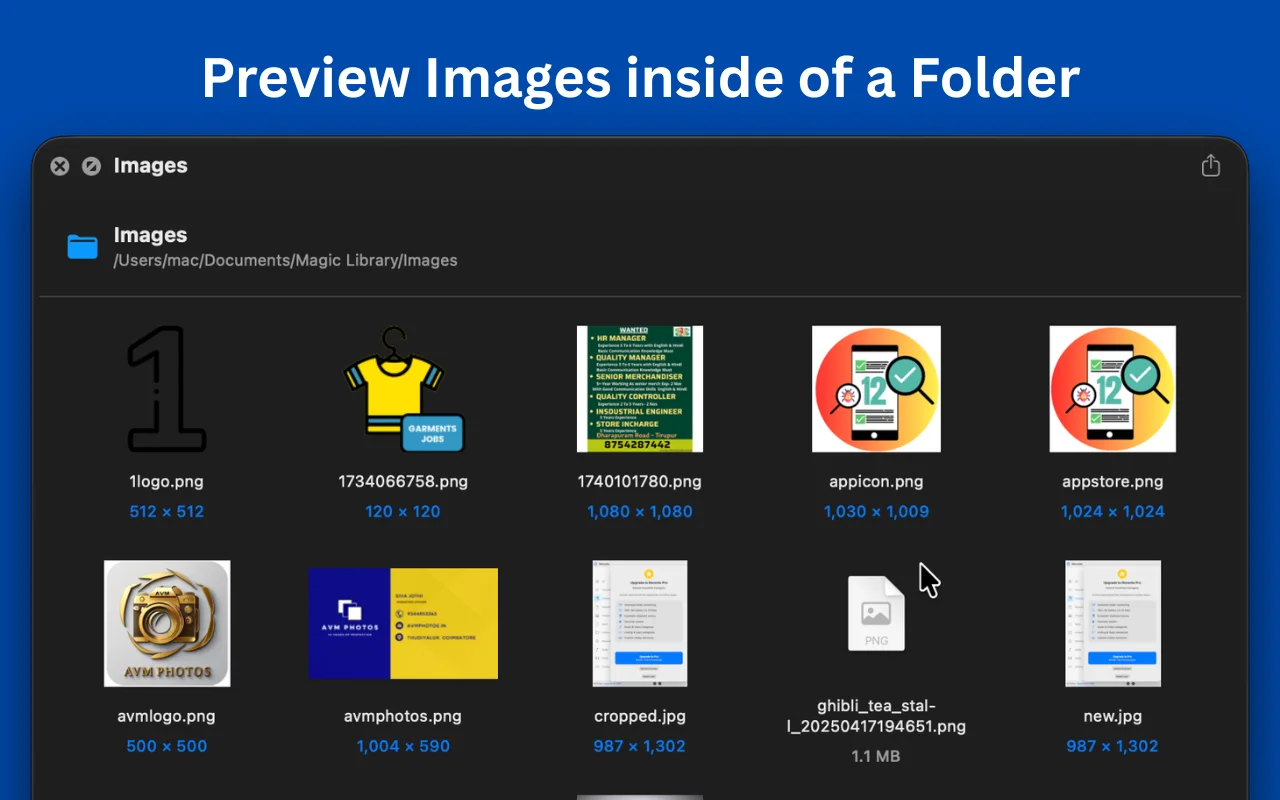
Folders full of photos render as a thumbnail grid instead of a list of filenames, so you can find the shot you are after by looking at it.
Grid, list or Native
Switch between a thumbnail grid, a detailed list, and a Native layout that looks like Finder's icon view. Set the thumbnail size and how items are sorted.
Source code you can select and copy
Around 85 languages, highlighted in GitHub's light and dark colors, with line numbers and real, selectable text. Minified JSON is re-indented; binary plists show as XML.
Markdown, notebooks and LaTeX
Markdown with a table-of-contents sidebar, Mermaid diagrams and math. Jupyter notebooks with outputs, tracebacks and plots. LaTeX rendered, with BibTeX as a searchable list. All of them reload live as you save.
Data, subtitles, torrents and web archives
CSV and TSV as sortable columns. Ten subtitle formats as a cue list. Torrents with their file tree and a Copy Magnet Link button. MHT web archives rendered offline.
Ebooks and comics
EPUB, MOBI, AZW3 and FB2 with a contents sidebar. CBZ, CBR, CB7 and CBT in a comic reader with thumbnails, two-page spreads and right-to-left manga mode.
Take one file out, leave the rest packed
Copy a file from inside an archive and paste it into Finder like any other file, or send it to a folder with Extract Selected…. Only the file you asked for is unpacked, so pulling one photo out of a 4 GB archive takes as long as that one photo.
Archives open in the app too
Press ⌘O, use Finder's Open With, or drop an archive on the window. It opens in its own window with a breadcrumb, a filter and sortable columns, and you can drag files straight out to the Desktop.
Open, copy and peek without leaving the preview
Double-click a file to open it in its usual app, or a folder to step into it, with a clickable breadcrumb to jump back. Right-click for Open With, Reveal in Finder, Copy, Copy Path or Quick Look, which shows the file in the same window and returns you to the folder exactly where you left off.
App bundles and hidden files
Press Space on an .app to see its contents. Show hidden files with one switch, and pick a Native layout that looks like Finder's icon view.
Works in Spotlight
Quick Look extensions power Spotlight's preview too, so everything above also works when you press Space on a Spotlight result.
Nothing leaves your Mac
Sandboxed like any App Store app. No Full Disk Access, no account, no analytics, no network calls for previews. When you press Space, macOS hands the extension that one item, nothing else is readable.
Fast on the second look
Previews are cached, so returning to a folder or archive is instant. Cache limits and expiry are yours to set, and you can clear the cache any time.
Guided setup
macOS ships every Quick Look extension switched off. The app walks you through turning them on, with a small guide window that floats over System Settings and confirms when each one goes live.
Stays current on its own
Updates are checked, downloaded and installed in the background, each one verified against a signing key before it is applied. Turn any of that off in Preferences.
The 13 extensions
Each one has its own switch in System Settings, so turn on only what you use.
| Extension | What it previews |
|---|---|
| Folders | Any folder or .app bundle, in list, grid or Native layout |
| Archives | ZIP, RAR, 7Z, TAR, GZ, BZ2, XZ, JAR, WAR, IPA, APK |
| Source Code | Around 85 languages, plus JSON, YAML, TOML, XML, plist |
| Plain Text | Logs, config files, NFO/DIZ art, READMEs |
| Markdown | MD, RMD, QMD, MDX, and Mermaid files |
| Jupyter Notebooks | IPYNB, with outputs, tracebacks and plots |
| LaTeX | TEX, STY, CLS, BIB |
| Tables | CSV, TSV, PSV as sortable columns |
| Subtitles | SRT, VTT, ASS, SSA, SUB, SBV, LRC, TTML, SAMI |
| Torrents | .torrent, with its file tree and a Copy Magnet Link button |
| Web Archives | MHT, MHTML, rendered offline |
| Ebooks | EPUB, MOBI, AZW, AZW3, FB2, with a contents sidebar |
| Comics | CBZ, CBR, CB7, CBT, in a two-page or manga reader |
Up and running in three steps
- 1
Install
Drag Quick X Folder Preview to your Applications folder.
- 2
Switch it on
Open the app once and follow the setup guide. It opens the right System Settings pane for you and shows which extensions to enable.
- 3
Press Space
Select any file or folder in Finder. That's it.
Formats it opens up
Archives
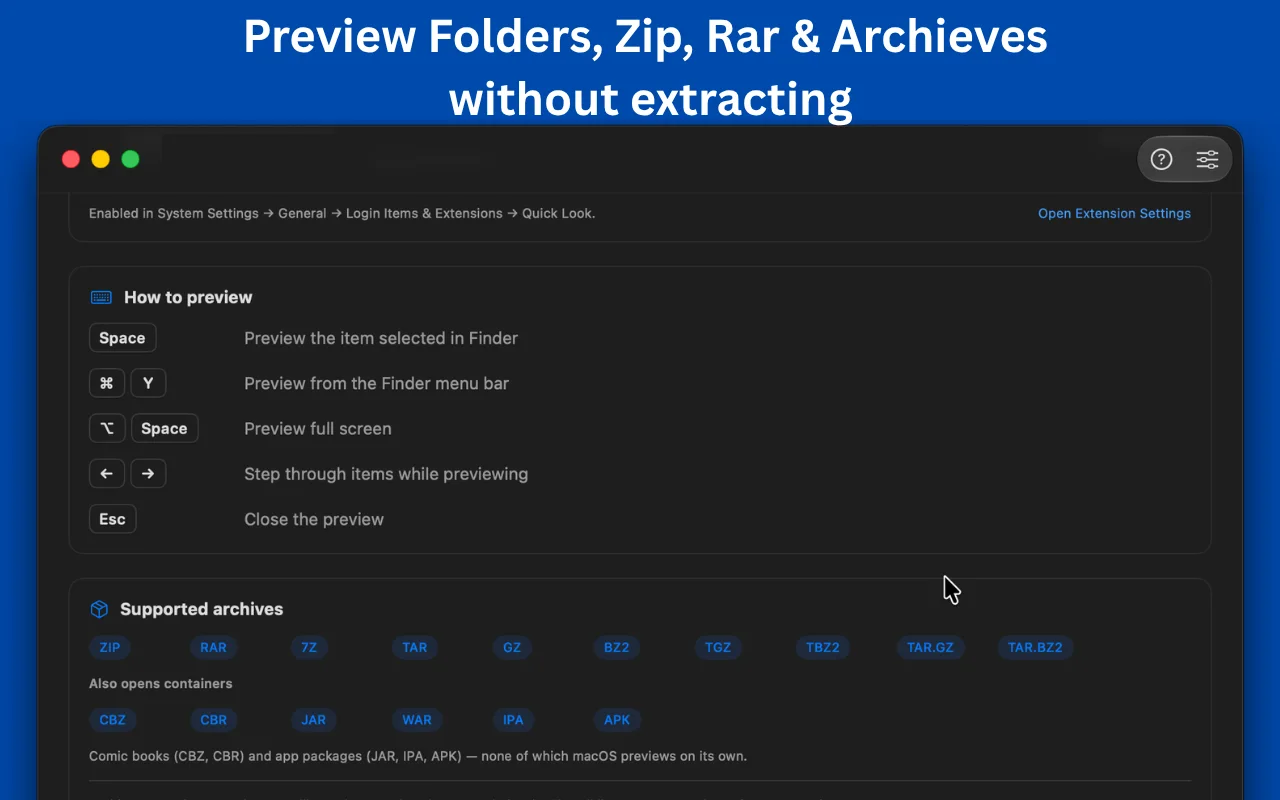
ZIP · RAR · 7Z · TAR · GZ · BZ2 · XZ · TGZ · TBZ2 · TXZ · TAR.GZ · TAR.BZ2 · TAR.XZ
Every archive format also opens in its own window in the app, where you can browse it, filter it and drag files out to the Desktop.
Containers
JAR · WAR · IPA · APK
Code & text
Around 85 languages, JSON, YAML, TOML, plist, logs, config files, NFO
Documents
Markdown (MD, RMD, QMD, MDX) · Mermaid · Jupyter (IPYNB) · TeX · STY/CLS · BIB
Data & subtitles
CSV · TSV · PSV · SRT · VTT · ASS · SSA · SUB · SBV · LRC · TTML/DFXP · SAMI
Other
Torrent · MHT/MHTML
Ebooks
EPUB · MOBI · AZW · AZW3 · FB2
Comics
CBZ · CBR · CB7 · CBT
Folders
Any folder or .app bundle, including nested contents up to a depth you choose.
Keyboard shortcuts
| Keys | Action |
|---|---|
| Space | Preview the item selected in Finder |
| ⌘ Y | Preview from the Finder menu bar |
| ⌥ Space | Preview full screen |
| ← → | Step through items while previewing |
| Esc | Close the preview |
| Double-click | Open a file, or step into a folder |
| Right-click | Open With, Quick Look, Reveal in Finder, Copy, Copy Path |
| ⌘ O | Open an archive in its own window |
One price. Yours for good.
Try every feature free for 14 days. Buy it once after that and every future update is included: no subscription, no renewal, no upgrade fee.
Lifetime license
One-time payment, after a 14-day free trial
- All 13 extensions and all future updates included, forever
- Folders, archives, code, Markdown, notebooks, data, ebooks and more
- No license key needed for the first 14 days
- Use it on your own Macs
- No subscription, no account, no tracking
Secure checkout by Paddle. Your license key is issued right after payment.
Or start the free trial firstStop opening things just to see what's inside
One press of the space bar and you know. Works alongside everything Finder already previews.
$4.99 one-time after the trial, all future updates included · macOS 13.0 (Ventura) or later · Apple silicon or Intel · Signed and notarized by Apple
Frequently Asked Questions
Want the full picture on Mac file previews? Read our complete guide to previewing files on Mac without opening them.