Stop charging at a limit you choose
Pick a charge limit from 20% to 100%. Recento Battery stops charging when the battery reaches it and runs your Mac from the charger instead, so the battery isn't held at full all day.

Recento Battery · Part of Recento Pro
Recento Battery is a MacBook charge limiter. Stop charging at the level you choose, drain the battery while plugged in, and pause charging when it gets hot.
macOS 14 or later · Apple Silicon & Intel
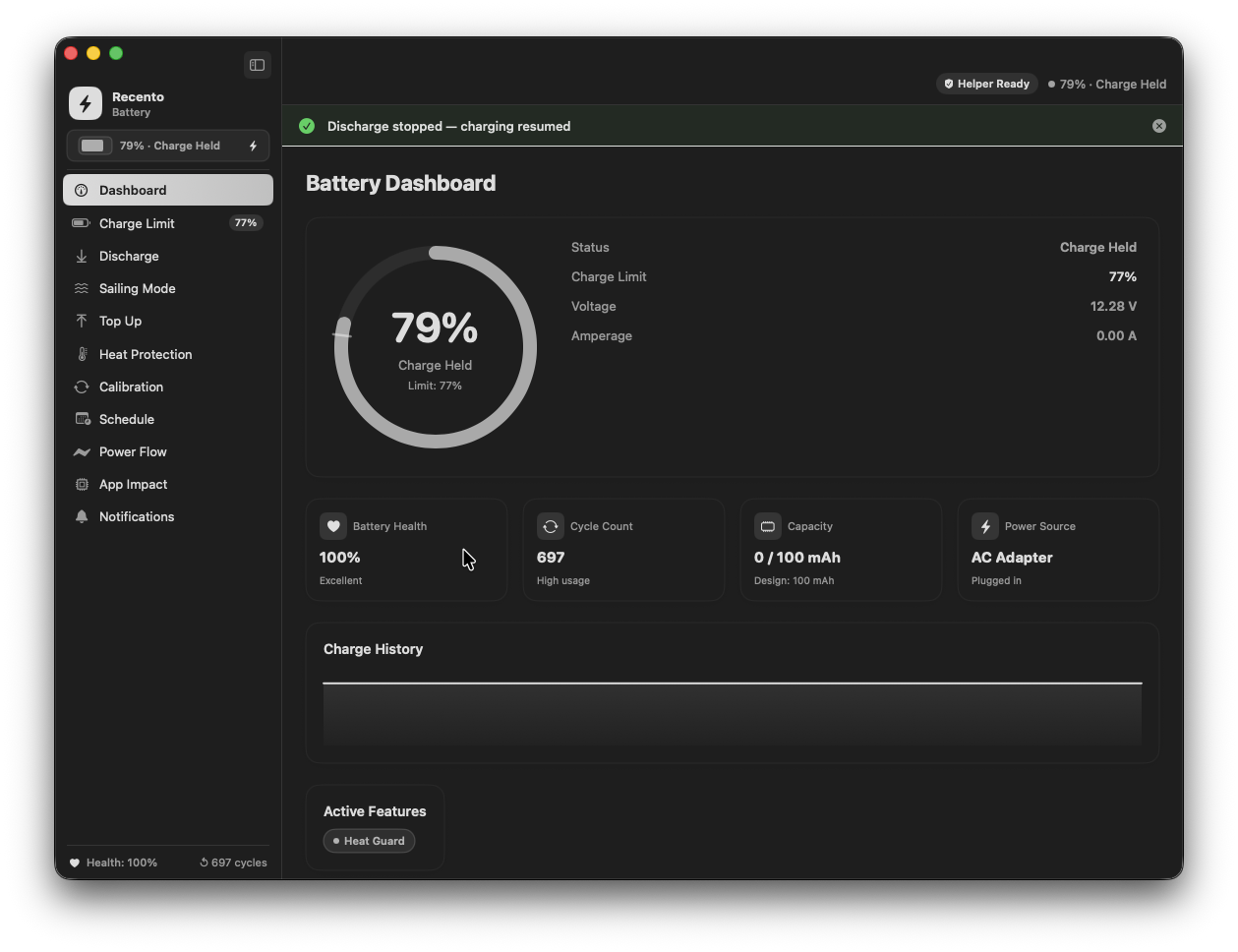
If your MacBook spends most of its life plugged in, its battery spends most of its life at 100%, often warm. Lithium batteries age fastest when they sit full and hot, which is why a MacBook that lives on the charger can lose capacity sooner than it should.
Recento Battery lets you decide how full the battery gets. Set a charge limit and it stops charging there, even while the charger stays connected. It can drain the battery down to that limit, pause charging when the pack is hot, top up to 100% when you need the full range, and show you the health, cycles and temperature over time.
Pick a charge limit from 20% to 100%. Recento Battery stops charging when the battery reaches it and runs your Mac from the charger instead, so the battery isn't held at full all day.
Heading out for the day? Top Up charges to 100% once, then your normal limit takes over again.
Discharge lowers the battery to your limit without unplugging, by running the Mac from the battery for a while. Automatic Discharge can do it for you whenever the level is above your limit. Nothing extra is run to burn power: the Mac simply uses the battery instead of the charger.
Every discharge has a heat limit (35 to 55°C, 42°C recommended). If the battery gets that warm, discharge pauses until it cools, then carries on to the same target. A temperature chart shows each discharge so you can see what happened.
Charging a hot battery wears it fastest. Set a temperature from 25 to 45°C and Recento Battery pauses charging above it, then resumes once the battery has cooled.
Instead of topping up every time the level dips by 1%, Sailing Mode lets the battery drift down a set range (1 to 20%) below the limit before charging again. Fewer tiny charges, less wear.
A guided cycle charges to 100%, drains to 10% while plugged in, charges back to 100%, holds there for an hour, then returns to your limit. It helps the battery report its capacity accurately.
Schedule a charge limit change, a Top Up, a calibration, a pause in charging or a discharge, daily, on weekdays, weekly, every two weeks or monthly.
See maximum capacity against design capacity, health, cycle count and temperature, with history over 6 hours, 24 hours or 7 days. Power Flow shows where the power is going: charger to Mac, charger to battery, or battery to Mac.
Get notified when the battery is low, almost full, or when a charger is connected but not delivering power. A charge reminder below a level you set (50% by default) stays on screen until you plug in or dismiss it, so it works even when you miss a banner.
See which apps are costing the most battery, so you know what to close before you unplug.
| Feature | Free version | Recento Pro |
|---|---|---|
| Health, cycles & Power Flow | Included | Included |
| Charge limit & Top Up | Included | Included |
| Sailing Mode | Not included | Included |
| Heat Protection | Not included | Included |
| Discharge | Not included | Included |
| Calibration | Not included | Included |
| Charge schedule | Not included | Included |
| App power impact | Not included | Included |
The charge limit is free. Recento Pro adds the rest for $9.99 a month or $99 one time, and unlocks every other module too.
Plans, trial and refund terms are on the Recento Pro pricing section.
Install Recento Pro, open Recento Battery, install the battery helper when prompted, and set the charge limit to 80%. The Mac stops charging at 80% and runs from the charger. Use Top Up whenever you want a full battery for a day.
Only a system-level process can tell the Mac's power controller to stop or start charging. Recento Battery installs a small helper for that, and macOS asks for your password once and for an "Allow in the Background" approval. You won't be asked again unless you reinstall.
No, and no third-party app's can: macOS 27 removed the firmware control these apps used. On those Macs Recento Battery says so and points you to Apple's own Charge Limit in System Settings, Battery. Discharge, health, cycles, temperature, Power Flow and alerts still work.
Yes, if you use Recento Battery's limit. macOS's Optimized Battery Charging and its own charge limit drive the same charging hardware, and the two can fight, so charging stops and starts. Turn Optimized Battery Charging off and set macOS's own limit to 100%, so Recento Battery is the only one in control.
By default, quitting puts charging back to normal so your Mac charges as usual. You can choose instead to keep charging stopped while the app is closed. If the app is force-quit or crashes while charging is paused, opening Recento Pro again restores the normal state.
Yes, with Recento Pro on Apple silicon Macs. Discharge runs the Mac from the battery until it reaches your target, then hands back to the charger. It pauses if the battery gets too warm and carries on once it cools. It isn't available on Intel Macs.
Yes, for the charge limit, health, cycles, temperature and alerts. Discharge isn't available on Intel Macs.
It tells you when a charger is connected but not delivering power, for example a charger that's plugged into the Mac but switched off at the wall, or a hub that connects without power. A charger that's completely dead often looks to the Mac exactly like no cable at all, and that case can't be detected.
The charge limit, Top Up, health, cycles, temperature, Power Flow and alerts are free. Sailing Mode, Heat Protection, Discharge, Calibration, schedules and app power impact need Recento Pro.
Download Recento Pro and set your charge limit in under a minute.
 Recento Statslive charger watts, battery health and the apps using the most energy, in the menu bar.
 Stay Awakekeep the Mac awake for long jobs, with a heat limit in Bag Mode.
 Better Wi-Fia reminder to plug in when you're at home or the office on battery.
 Recento Guardan alarm if anyone pulls the charger out while you're away.
 Lid Folda fold animation that follows your MacBook's lid.