Public beta

Ten Mac utilities.
One menu bar icon.

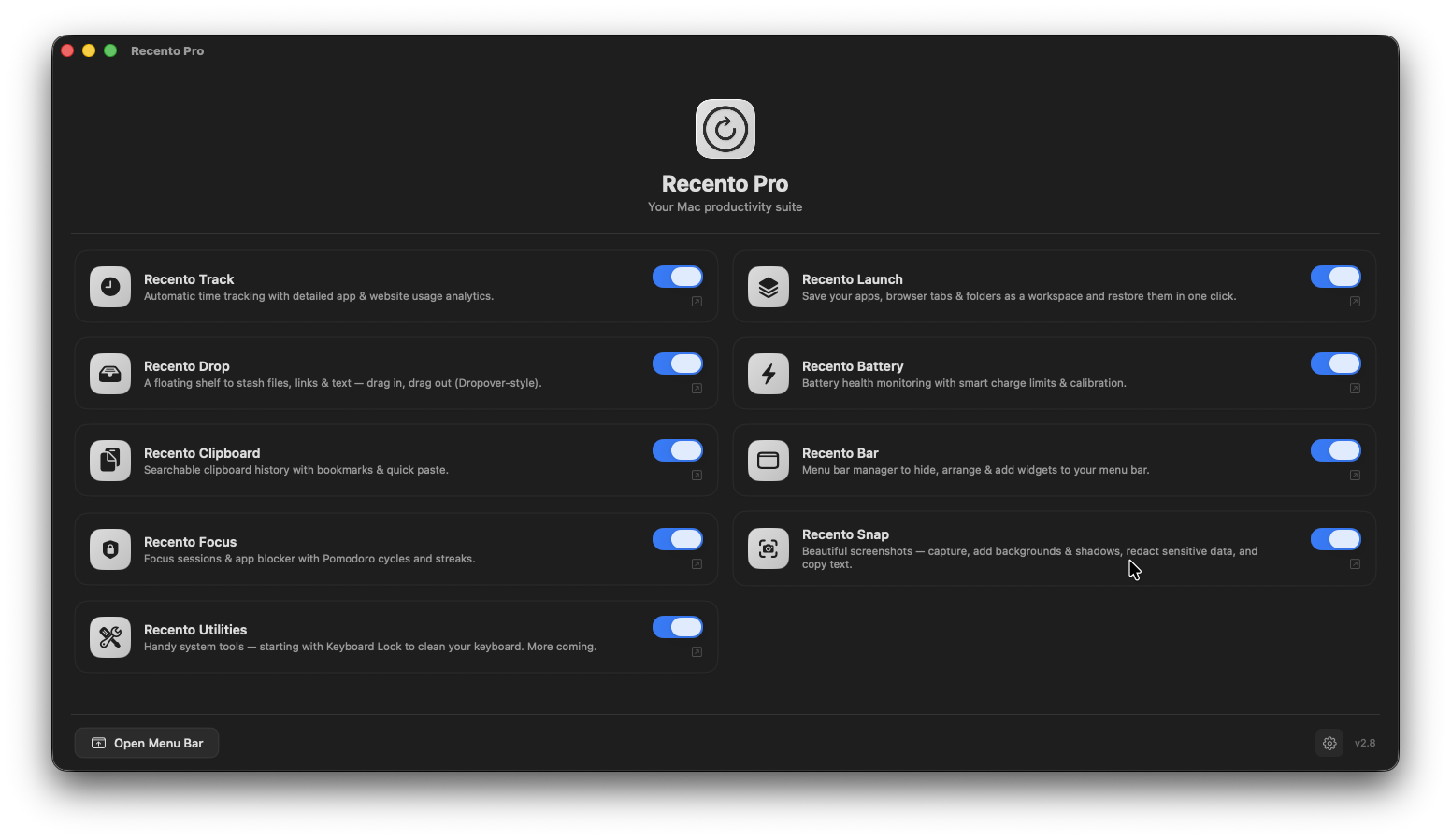
Recento Pro replaces the pile of single-purpose utilities on your Mac, recent files, time tracking, clipboard history, battery care, screenshots, focus sessions, menu bar management and more, with one native app that runs quietly in the background.

macOS 14 or later · Apple Silicon & Intel

  • Native Swift, not Electron
  • Runs entirely on your Mac
  • No account required
  • No subscription
Recento Pro window showing all ten modules with toggles

You have got one app for clipboard history. Another for screenshots. A third for battery limits. Each one wants menu bar space, login items, RAM, and its own $15.

They do not talk to each other. You paid for all of them separately. And half of them are Electron apps eating 300 MB to do something macOS could do in 5.

Recento Pro is all of it, written natively, in one place.

What's included

All ten modules, in every download.

Recents

Everything you just worked on, one keystroke away.

  • Every file you touched, ranked by recency
  • Filter by type, folder, or your own custom rules
  • Cmd 1 to 9 to reopen instantly from anywhere

Recento Track

Find out where your day actually went.

  • Automatic time tracking, no timers to start
  • Per-app and per-website breakdown
  • Group work into projects, export the numbers

Recento Battery

Make your battery last years, not months.

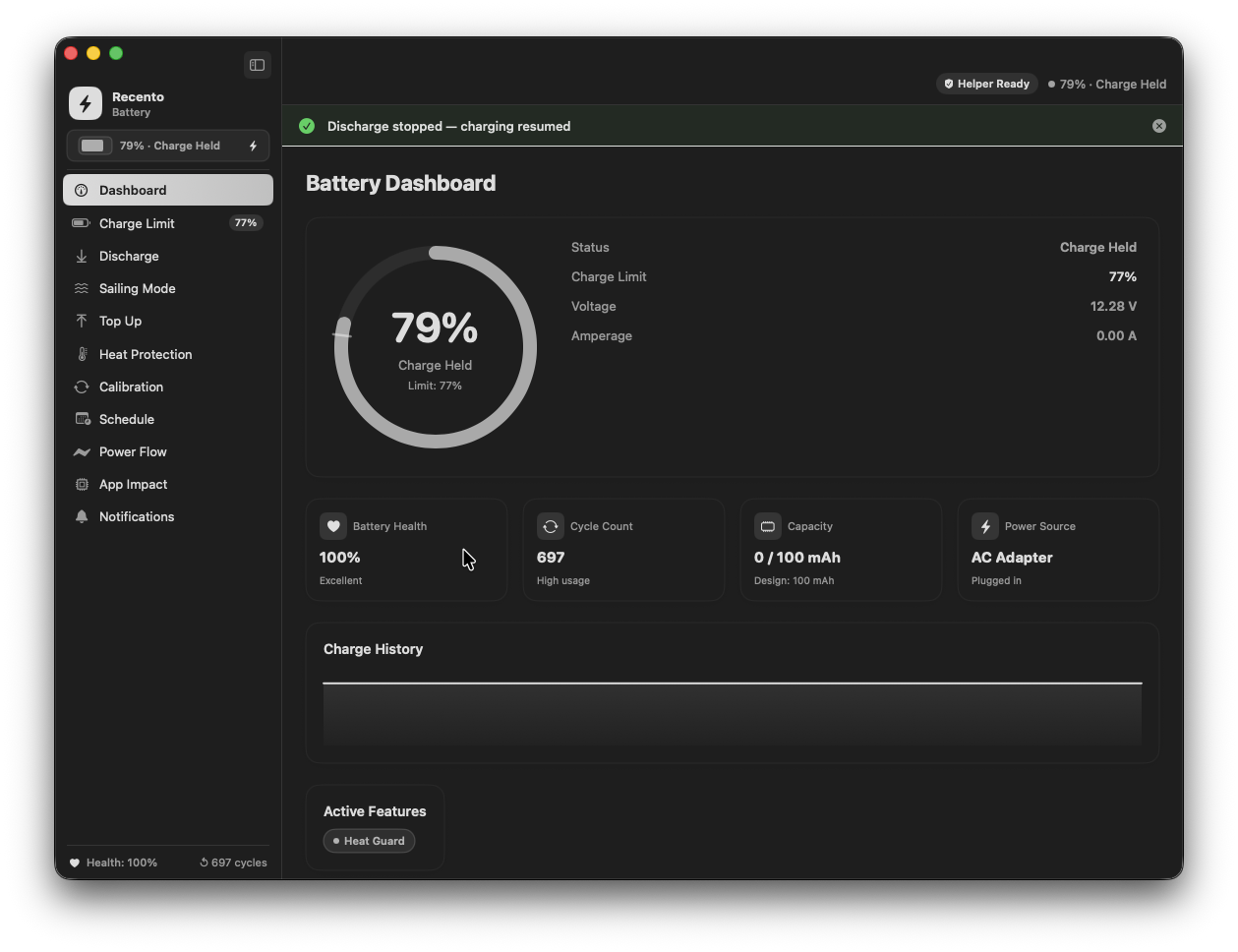
  • Charge limits and full health readout
  • Remind me to charge, an on-screen reminder that stays until you plug in
  • Sailing Mode, Heat Protection and guided calibration

Recento Clipboard

Never lose something you copied again.

  • Searchable history of everything you have copied
  • Pin the snippets you reuse constantly
  • Text, images, links and files

Recento Snap

Screenshots that look designed, not dumped.

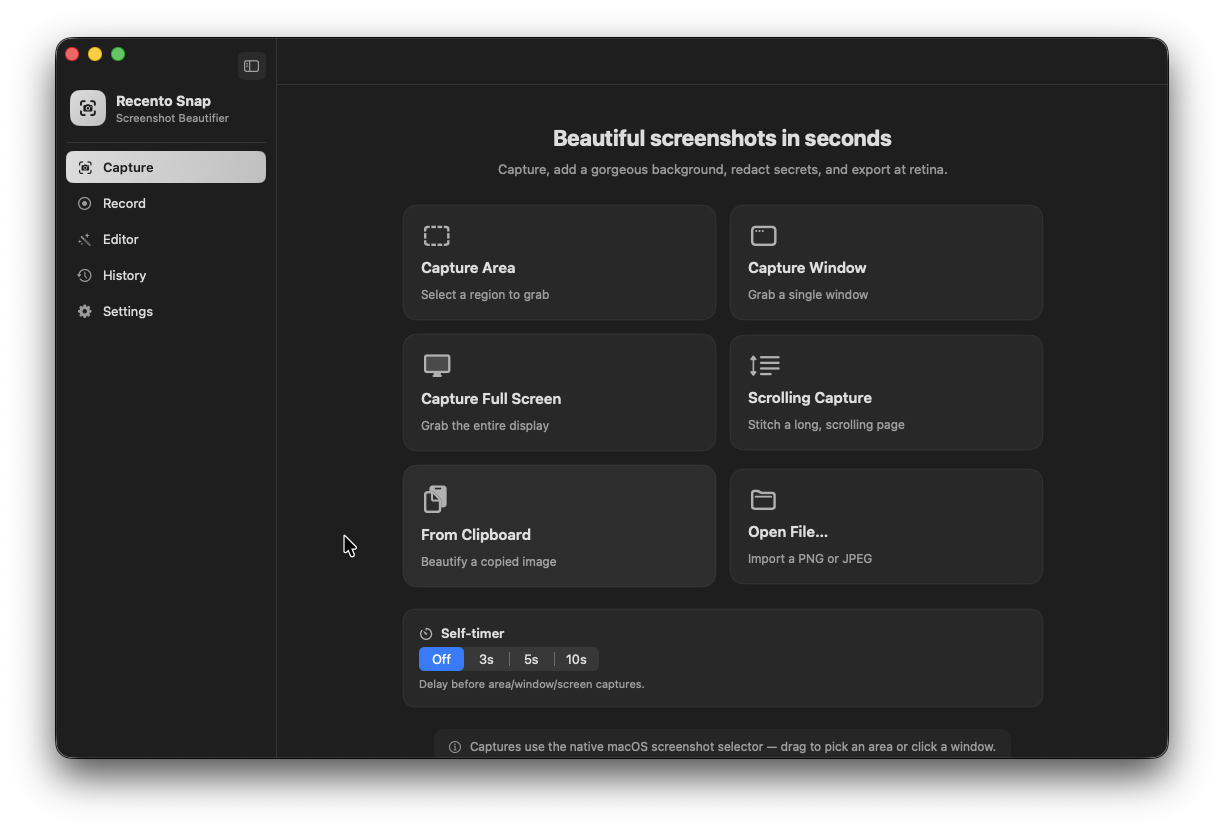
  • Backgrounds, shadows, annotations, auto-redaction
  • Scrolling capture for full pages
  • Screen recording and GIF export

Recento Launch

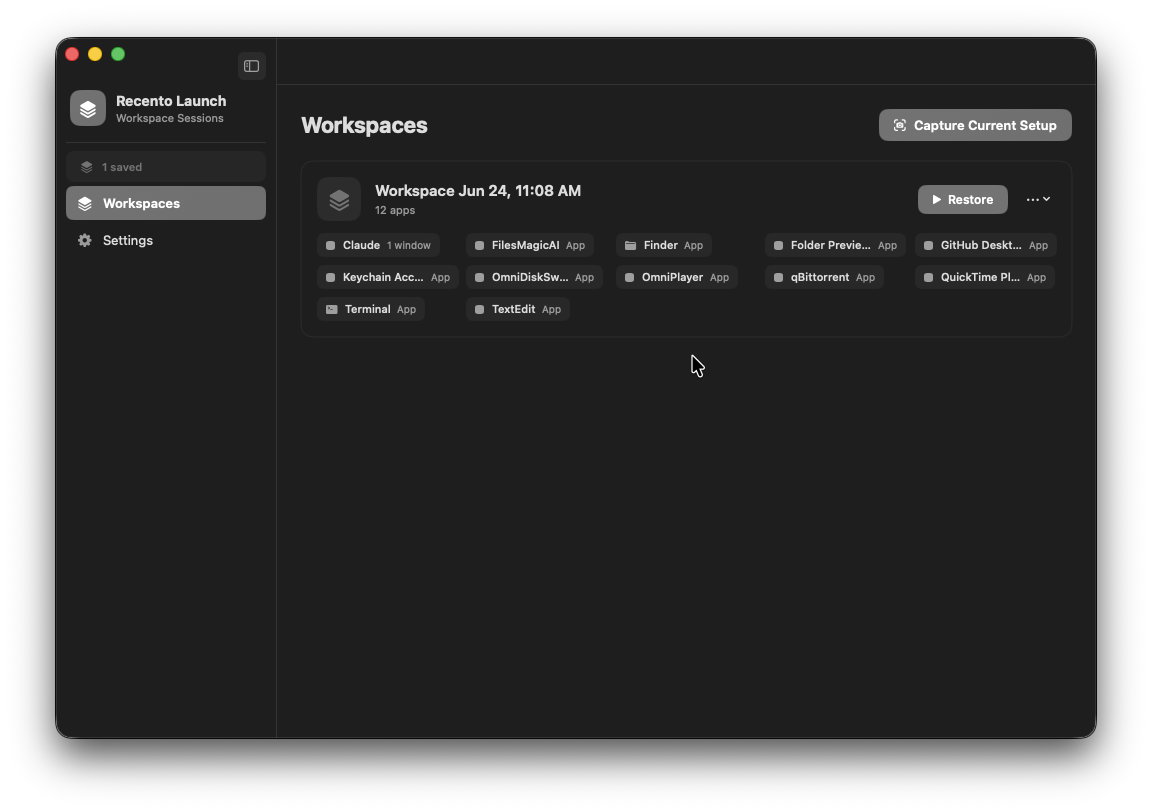
Your whole setup, restored in one click.

  • Save your apps, browser tabs and folders as a workspace
  • Reopen the entire environment instantly
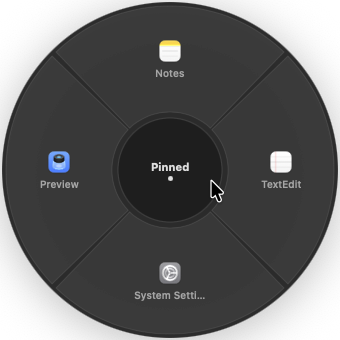
  • Radial launcher on Option Space, flick to launch

Recento Focus

Actually finish the thing.

  • Block distracting apps for a set session
  • Pomodoro cycles built in
  • Streaks and history so you can see progress

Recento Bar

Take your menu bar back.

  • Hide the icons you do not need
  • Add custom widgets for what you do
  • Cmd Shift Space quick search across menu bar items

Recento Drop

A shelf for the drag you are in the middle of.

  • Floating shelf that holds files, links and text
  • Shake the cursor to summon it
  • Drag in from one app, out into another

Recento Utilities

The small tools you did not know you needed.

  • Keyboard Lock, wipe your keyboard without typing nonsense
  • Auto-eject installer disk images after you install
  • Stop external drives ejecting when you do not want them to

Recento Battery

Remind me to charge

Notification banners disappear after four seconds. If you missed it, you missed it, and your Mac dies mid-sentence.

Recento Battery puts a reminder on screen and leaves it there until you plug in or dismiss it. It works even if you never granted notification permission, because it does not use notifications.

Recento Battery charge limit and health readout

Recento Launch

The radial launcher

Press Option Space anywhere. A wheel appears at your cursor. Flick toward what you want and release.

Other launchers open apps. This one opens entire workspaces, every app, tab and folder from a saved session, in one flick. Nothing else on the Mac does that.

Recento Launch radial app launcher

Recento Snap

Screenshots worth sending

Capture, then drop it on a gradient with a soft shadow. Annotate it. Blur the parts nobody should see, automatically, using on-device text recognition.

Scrolling capture handles full pages. Recording handles the rest.

Recento Snap screenshot capture and editing

Free version vs paid version

Every module works in the free version.

Every module is installed and working in the free version. The paid version removes the limits.

FeatureFree versionPaid version
Recents
Monitored folders3Unlimited
File history15 items170 items
Custom filters1Unlimited
Favourites
Quick-open shortcutsCmd 1 to 5Cmd 1 to 9, 0
Category hotkeys
Recento Track
Automatic time tracking
History retained7 days365 days
Projects and categories
Reports
CSV / JSON export
Recento Battery
Charge limit, Top Up, health
Sailing Mode
Heat Protection
Calibration
Discharge and schedule
App power impact
Recento Clipboard
Clipboard history50 itemsUnlimited
Pinned items and Top Copied
Recento Snap
Screenshots, editing, annotations
Export watermarkRemoved
Screen recording
Scrolling capture
Capture historyLast 10Unlimited
Recento Launch
Workspaces2Unlimited
Radial quick launcher
Quick launcher pins4Unlimited
Templates, Park, auto-detect
Recento Focus
Focus sessions and app blocking
Allowlist profiles1Unlimited
Pomodoro cycles
Session analyticsBasicFull history
Recento Bar
Hide and rearrange icons
Custom widgets2Unlimited
Automation triggers
Recento Drop
Floating shelf
Items on the shelf10Unlimited
Recento Utilities
Keyboard Lock and auto-eject
Protected volumes1Unlimited

One payment. No subscription. Free updates.

Public beta

Get in before launch.

Recento Pro is in public beta. It is stable enough to use every day, that is how we use it, but you will find rough edges and we want to hear about them.

If you buy now, you get the lifetime licence at the pre-launch price and every future update free. The price goes up at launch.

Pre-launch lifetime licences
$19.99once

Regular price at launch $99. That is 80% off, and it will never be this price again.

Licence
Lifetime
Recurring fee
None
Included
Every module, every paid feature
Checkout
Paddle
Get the licence, $19.99

Secure checkout and applicable taxes are handled by Paddle, our merchant of record.

Free licences for testers
Freefor testers

Want one? Tell us what you would use it for and what you would want fixed. We would rather have ten people who report bugs than a thousand silent installs.

  • It is a beta. Expect bugs. Please report them.
  • A lifetime licence covers this app forever, including all future modules.
  • If it does not work for you, email us within 30 days and we will refund you.
  • Checkout and billing handled by Paddle. We never see your card details.

Your data never leaves your Mac.

Recento tracks what you do so it can show it back to you. That information stays on your machine. There is no server, no account, no sync we can read, and no analytics on your file names or screen contents.

  • No account required. Download and use it.
  • No telemetry on your content, ever.
  • Anonymous crash diagnostics are opt-in, and off unless you turn them on.
  • Notarised by Apple. Signed with a Developer ID.
  • macOS permissions are requested only when a module needs one, and we tell you exactly which module and why.

Frequently asked questions

Is this a subscription?

No. One payment, yours forever, all future updates included.

Does the free version expire?

No. It is not a trial. It stays free and functional for as long as you want.

What macOS do I need?

macOS 14 (Sonoma) or later. Apple Silicon and Intel are both supported.

Can I use it on more than one Mac?

Yes. The licence covers your personal Macs.

Why does it need Accessibility or Screen Recording permission?

Accessibility lets Recento see which app is frontmost, which is what time tracking, focus blocking and restoring workspaces rely on. Screen Recording is what macOS requires of any app that captures the screen, so Snap and Bar need it. Neither is used for anything else, and both are optional. The rest of the app works without them.

Does it slow my Mac down?

It is native Swift, not Electron. It is a menu bar app that idles most of the time.

macOS 26.4 added a battery charge limit. Do I still need Recento Battery?

Apple's built-in limit stops at 80% and does nothing else. Recento Battery adds Sailing Mode, Heat Protection, guided calibration, scheduling, per-app power impact and the persistent charge reminder. On the newest macOS builds Apple's firmware handles the limit itself, and Recento defers to it rather than fighting it.

What happens when the beta ends?

Your licence keeps working. Pre-launch buyers keep the lifetime licence at the price they paid.

Can I get a refund?

Yes, 30 days, no argument.

One app. Ten tools. One payment.

Start with the free version, every module is included. Upgrade when you hit a limit that matters to you.