Save your whole setup
Capture your running apps, their windows, your browser tabs and your open Finder folders as one named workspace. A checklist lets you keep exactly the apps and tabs you want and leave the rest out.
Recento Workspaces · Part of Recento Pro
Recento Workspaces lets you save and restore Mac workspaces: your apps, browser windows and tabs, Finder folders and terminal sessions, back in one click when you return to a project.
macOS 14 or later · Apple Silicon & Intel
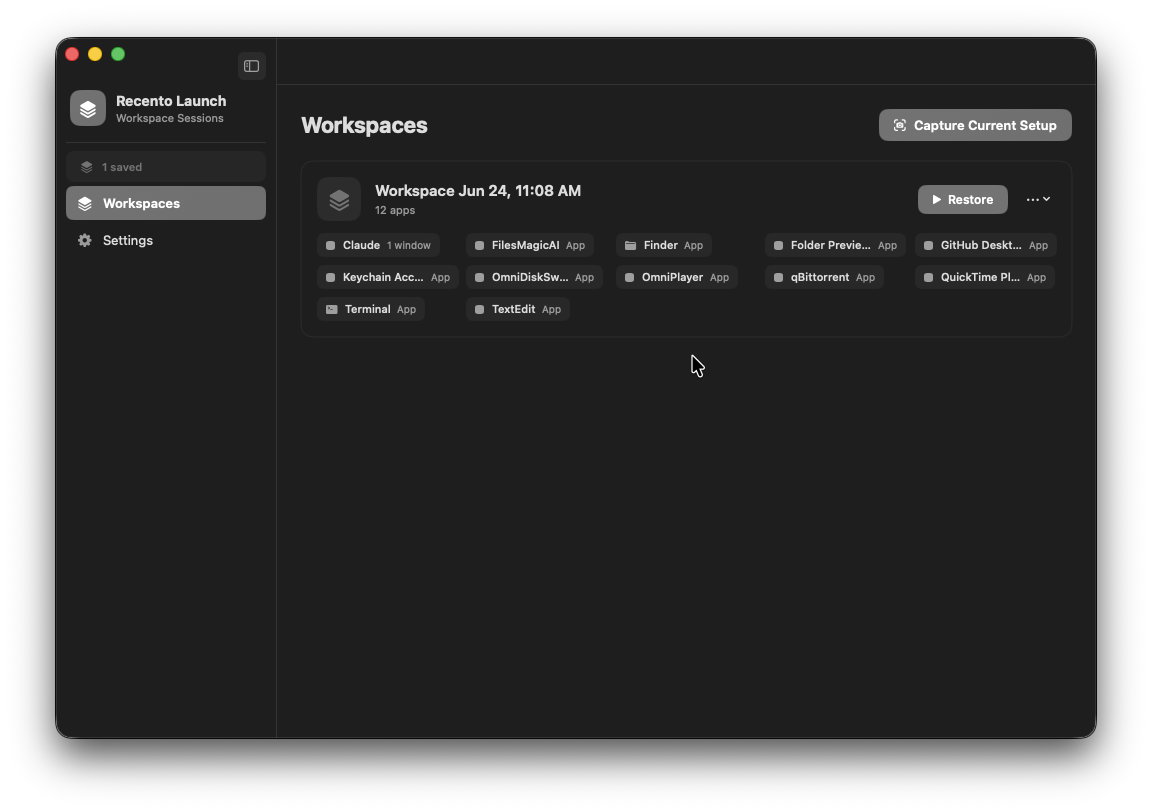
Every project has its own setup: a few apps, a dozen browser tabs, a couple of Finder folders and a terminal in the right directory. Rebuilding that by hand every morning, or every time you switch clients, costs real time and breaks your train of thought.
Recento Workspaces saves that setup as a named workspace and restores it in one click. It opens only what is missing, keeps browser windows apart, and can park the session you are leaving so nothing is lost when you switch.
Capture your running apps, their windows, your browser tabs and your open Finder folders as one named workspace. A checklist lets you keep exactly the apps and tabs you want and leave the rest out.
Recento launches the apps that are not running, reopens your tabs and folders, and puts windows back where they were where the app allows it. Apps already open are left alone.
Before reopening anything, Recento checks which pages are already open and opens only the ones that are missing. Restore the same workspace twice and you will not get a second copy of every tab.
Tabs come back in the windows they were saved in, in the same order, with the same tab in front. Browsers with scriptable profiles reopen each window under its own profile.
Terminal windows reopen in the directories you were working in, and code editor projects reopen at the folders you had open. You pick up where you left off.
Switching projects? Park saves the current session first, then hides (or politely quits) what the next workspace does not need. Parked sessions are kept so you can bring one back with a click.
Link a workspace to one of your macOS Focus modes and it turns on when you restore it. Closing the workspace turns it back off.
When you share your screen in a call, Recento offers to tuck your personal apps away and close chosen tabs. One click brings everything back after the meeting.
Open a couple of a workspace's distinctive apps and Recento suggests restoring the rest. It learns which apps are everyday and which really identify a project, so it does not guess wrong just because your mail app is open.
Save a workspace as an apps-only template to start new projects from, and attach files and links that should open with it.
| Feature | Free version | Recento Pro |
|---|---|---|
| Save & restore apps, tabs & folders | Included | Included |
| Focus Mode, Meeting Mode & terminals | Included | Included |
| Saved workspaces | 2 | Unlimited |
| Park the current session | Not included | Included |
| Templates | Not included | Included |
| Auto-detect | Not included | Included |
| Linked files & links | Not included | Included |
Recento Pro is $9.99 a month after a 2 day free trial (cancel any time) or $99 once for a lifetime licence, and it unlocks every module.
Plans, trial and refund terms are on the Recento Pro pricing section.
Yes. Recento Workspaces saves your running apps, browser tabs, Finder folders and terminal directories as a named workspace. Restoring it reopens everything that is not already open.
No. Recento first reads which pages each browser already has open and opens only the missing ones. If it cannot read a browser (for example you declined permission), it skips that browser and says so rather than risk duplicates.
It tries. Window positions and sizes are restored through Accessibility where the app allows it, but some apps manage their own windows, and placement on multiple displays may not be exact.
Safari and the popular browsers that let other apps read and open their tabs through macOS Automation. Each browser is listed in settings with its permission status.
macOS does not let apps switch Focus modes directly, so Recento runs a shortcut from the Shortcuts app named for that mode. Create the shortcut once (Recento shows the name it looks for) and the Focus turns on with the workspace. If the shortcut is missing, Recento tells you.
Park saves your current session as a dated snapshot, then hides the apps the next workspace does not need. You can choose to quit them instead. Apps with unsaved work stay open and are named. Park is part of Recento Pro.
When a calling app is running and a microphone is in use, Recento offers to hide your personal apps and close chosen tabs while you share your screen. It saves what it hides first, so one click brings it all back. It does not detect meetings held in a browser tab.
Two. Recento Pro allows unlimited workspaces and adds Park, templates, auto-detect and linked files and links.
Download Recento Pro, save your first workspace, and get back to work in one click.


