Allow only the apps you pick
Instead of listing everything to block, list what you need. During a session, any other app that comes to the front is stopped. Finder and the essential parts of macOS always stay available.

Recento Focus · Part of Recento Pro
Recento Focus is an app blocker for Mac built around an allowlist. Start a focus session, choose the apps you need, and everything else is kept out of your way until the session ends.
macOS 14 or later · Apple Silicon & Intel
It only takes one click on a chat app or a feed to lose half an hour. Willpower is not much help when the distraction is one keystroke away and your hand already knows the way.
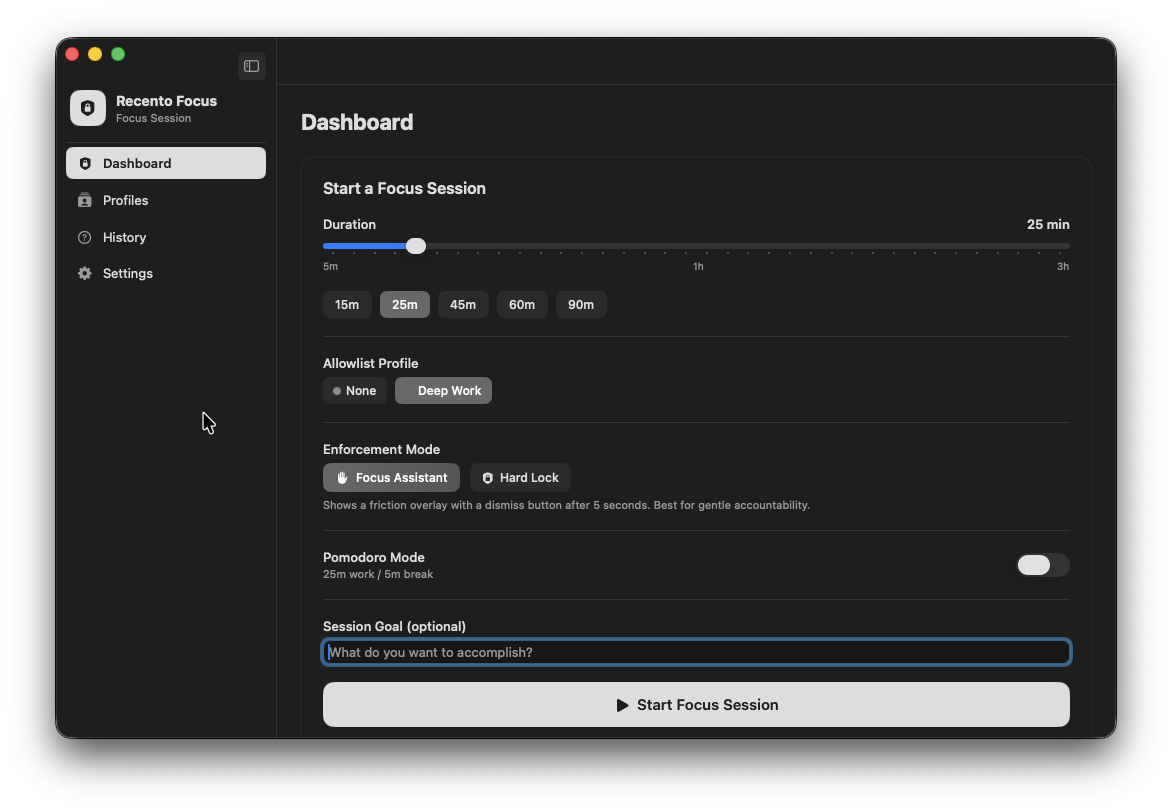
Recento Focus takes the decision out of the moment. You pick the apps you need for the session, and Recento keeps every other app out of reach until the timer ends, with either a gentle nudge or a hard lock that hides blocked apps the instant they come forward.
Instead of listing everything to block, list what you need. During a session, any other app that comes to the front is stopped. Finder and the essential parts of macOS always stay available.
Save a profile for writing, one for coding and one for study, each with its own allowed apps. Start the right one in a click.
In Nudge mode a blocked app is covered by a calm reminder. After a five-second pause you can let yourself through for a short while, which is enough friction to break the habit without locking you out.
In Hard Lock mode a blocked app is hidden the moment it comes forward, and again if you launch it. Ending the session early means typing "I am done focusing", so quitting is a decision rather than a reflex.
For the strictest sessions, turn on quitting blocked apps. Recento asks them to quit politely, the same way the Quit menu does, so an app with unsaved work can still ask you to save. It never touches Recento itself, Apple's own apps or Finder.
Work in sprints with breaks in between: 25 minutes of focus and 5 minutes off by default, with a longer break after several sprints. Blocking pauses during breaks and resumes when the next sprint starts.
Every finished session counts toward your streak, and your history shows how much focused time you put in. It is a simple way to see the habit build.
| Feature | Free version | Recento Pro |
|---|---|---|
| Focus sessions & app blocking | Included | Included |
| Nudge & Hard Lock modes | Included | Included |
| Allowlist profiles | 1 | Unlimited |
| Pomodoro cycles | Not included | Included |
Recento Pro is $9.99 a month after a 2 day free trial (cancel any time) or $99 once for a lifetime licence, and it unlocks every module.
Plans, trial and refund terms are on the Recento Pro pricing section.
Create a profile in Recento Focus with the apps you need, then start a session. Any other app that comes to the front is covered by a reminder in Nudge mode, or hidden immediately in Hard Lock mode, until the session ends.
Yes. Hard Lock hides blocked apps as soon as they open or come forward, and ending the session early requires typing the phrase "I am done focusing". You can also have blocked apps quit automatically.
No. Recento Focus blocks apps, not individual websites. If your browser is not on your allowed list, the whole browser is kept out of the way during the session.
No. macOS Focus modes silence notifications. Recento Focus keeps you out of apps. They work well together. Separately, Recento Workspaces can switch on a macOS Focus mode when you restore a workspace.
Hiding an app never closes it, so nothing is lost. The optional quit setting asks apps to quit politely, so apps with unsaved changes can still prompt you to save. It is off by default.
Yes. Pomodoro cycles alternate focus sprints with short breaks and a longer break after several sprints, starting at 25 and 5 minutes. Pomodoro cycles are part of Recento Pro.
The free version includes focus sessions, app blocking, Nudge and Hard Lock, streaks and history, with one allowlist profile. Recento Pro adds unlimited profiles and Pomodoro cycles.
Yes. Finder, the Dock, Spotlight, Control Center and the other essential parts of macOS are always allowed, so you can still find files and change settings.
Download Recento Pro, set up your first profile, and start a session.


