Tracking that starts itself
Your time is recorded as you work, with nothing to start or stop. Recento Track notices each app you switch to and keeps every session, however short, so the totals add up to your real day.
Recento Track · Part of Recento Pro
Recento Track is automatic time tracking for Mac. It records the apps and websites you use, lays your day out hour by hour, and turns project time into invoices, with no timer to remember.
macOS 14 or later · Apple Silicon & Intel
Manual timers only work when you remember to start them. Most days you don't, and at the end of the week you are guessing how long that client project really took, or wondering where the afternoon went.
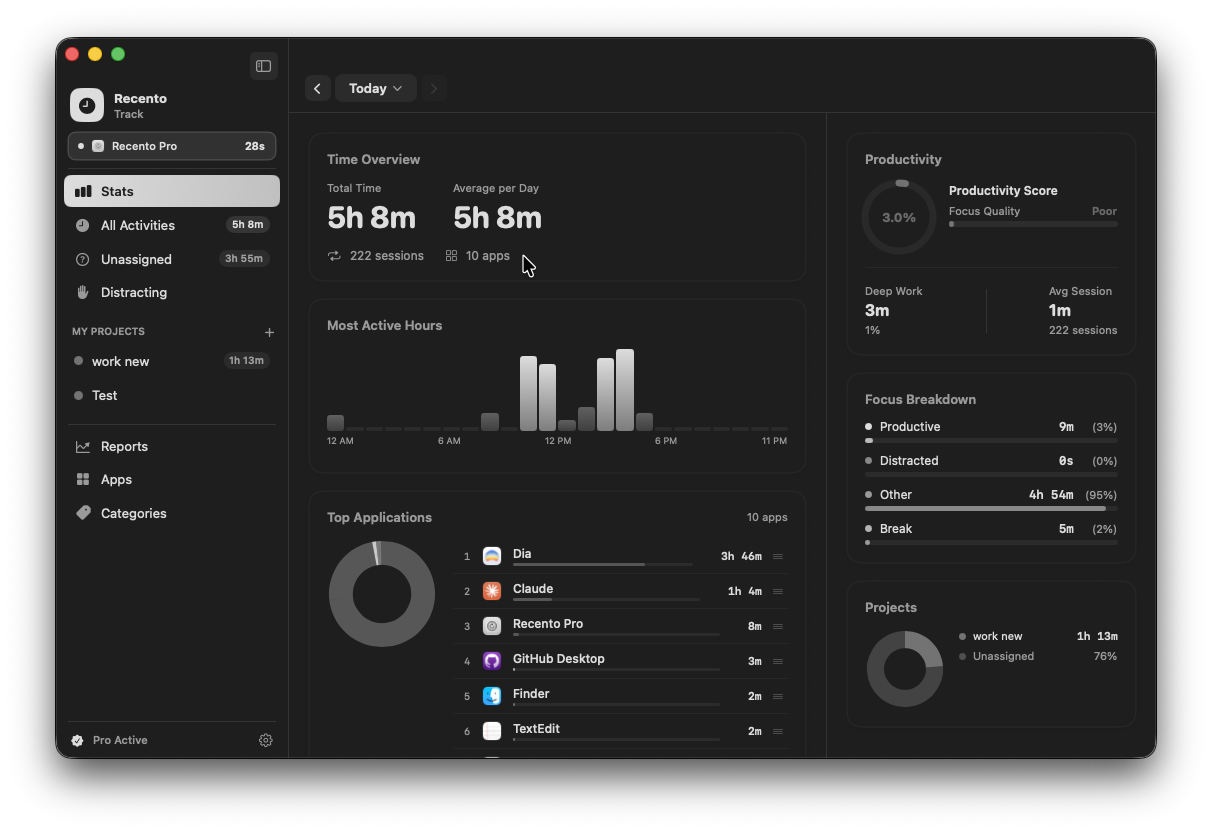
Recento Track gives you automatic time tracking for Mac. It runs quietly in the background, notes which app is in front and which website is open, and builds a timeline of your day. File that time into projects with simple rules, set an hourly rate, and export an invoice PDF when the work is done.
Your time is recorded as you work, with nothing to start or stop. Recento Track notices each app you switch to and keeps every session, however short, so the totals add up to your real day.
See which sites took your time, not one big block labelled with your browser's name. Website tracking works in Safari and the popular Mac browsers once you allow Recento to read the open tab.
Your day is laid out hour by hour, one column per day, with overlapping activity placed side by side instead of on top of each other. A session that runs past midnight shows up on both days.
Group apps and websites into projects and let rules file new time for you. A project can hold time from your editor, your design tool and the client's website at once.
Mark a project billable, add a client, currency, hourly rate and budget, and watch the billable amount build up. When you are done, export an invoice PDF that lists app and website time together.
See where the day went by app, by category and by project. Reports give you a productivity view without you having to sort anything by hand.
When you step away, Recento Track stops counting at your last input instead of quietly logging the gap. When you come back it asks what happened, so you can log a meeting or phone call to a project, or leave it out.
Turn on calendar access and your meetings appear next to your tracked activity. That makes it easy to reconcile project time and billable hours at the end of the week.
A small menu bar icon shows today's total, what is being tracked right now and your top apps. Pause and resume tracking from the same menu.
Turn on iCloud sync and your history follows you from one Mac to another. It uses your own private iCloud account and your projects come along too.
| Feature | Free version | Recento Pro |
|---|---|---|
| Automatic app & website tracking | Included | Included |
| Activity timeline | Included | Included |
| Projects, billing & invoices | Included | Included |
| iCloud sync between Macs | Included | Included |
| Reports, Apps & Categories range | Today | Any date range |
| Custom categories | 1 | Unlimited |
Recento Pro is $9.99 a month after a 2 day free trial (cancel any time) or $99 once for a lifetime licence, and it unlocks every module.
Plans, trial and refund terms are on the Recento Pro pricing section.
No. It tracks automatically from the moment it is on. You can pause and resume tracking from the menu bar icon whenever you want a break from it.
Yes. In Safari and most popular browsers it records which site was in front and for how long. macOS asks once per browser for permission. If you decline, Recento Track still tracks the browser as an app.
It stops counting at your last keyboard or mouse input, so idle time is not counted as work. When you return it asks what you were doing, and you can log that gap to a project or skip it.
Yes. Mark a project billable, set a client, currency and hourly rate, and export an invoice PDF. Projects, billing and invoices are included in the free version.
In the free version, the Reports, Apps and Categories pages show today only, and you can create one custom category. Tracking, the timeline, projects, invoices and iCloud sync are all free.
Only if you turn on iCloud sync, and then it goes to your own private iCloud account. There is no Recento account and no server of ours that sees your activity.
Yes. Turn on iCloud sync on both Macs with the same iCloud account and your sessions and projects sync between them.
Yes. A small icon shows today's total, the app being tracked now and your top apps, with a Pause Tracking option. You can hide the icon in settings.
Download Recento Pro, open Recento Track, and let your day record itself.


