Leaves a weak network by itself
When your signal falls below your threshold, Better Wi-Fi looks for a network this Mac has joined before that is clearly stronger, and switches to it. You stop noticing dead spots instead of fighting them.
Better Wi-Fi · Part of Recento Pro
Better Wi-Fi moves your Mac off a weak or dead network and onto a stronger one you already use. Free in Recento Pro.
macOS 14 or later · Apple Silicon & Intel
A Mac holds on to the Wi-Fi network it joined first. Walk from the living room to the office and it can stay on the faint router two rooms away while a strong one sits right next to you. Worse, a router can show full bars while its internet connection is down, and the Mac happily stays put. What you want is for your Mac to auto switch to stronger Wi-Fi by itself.
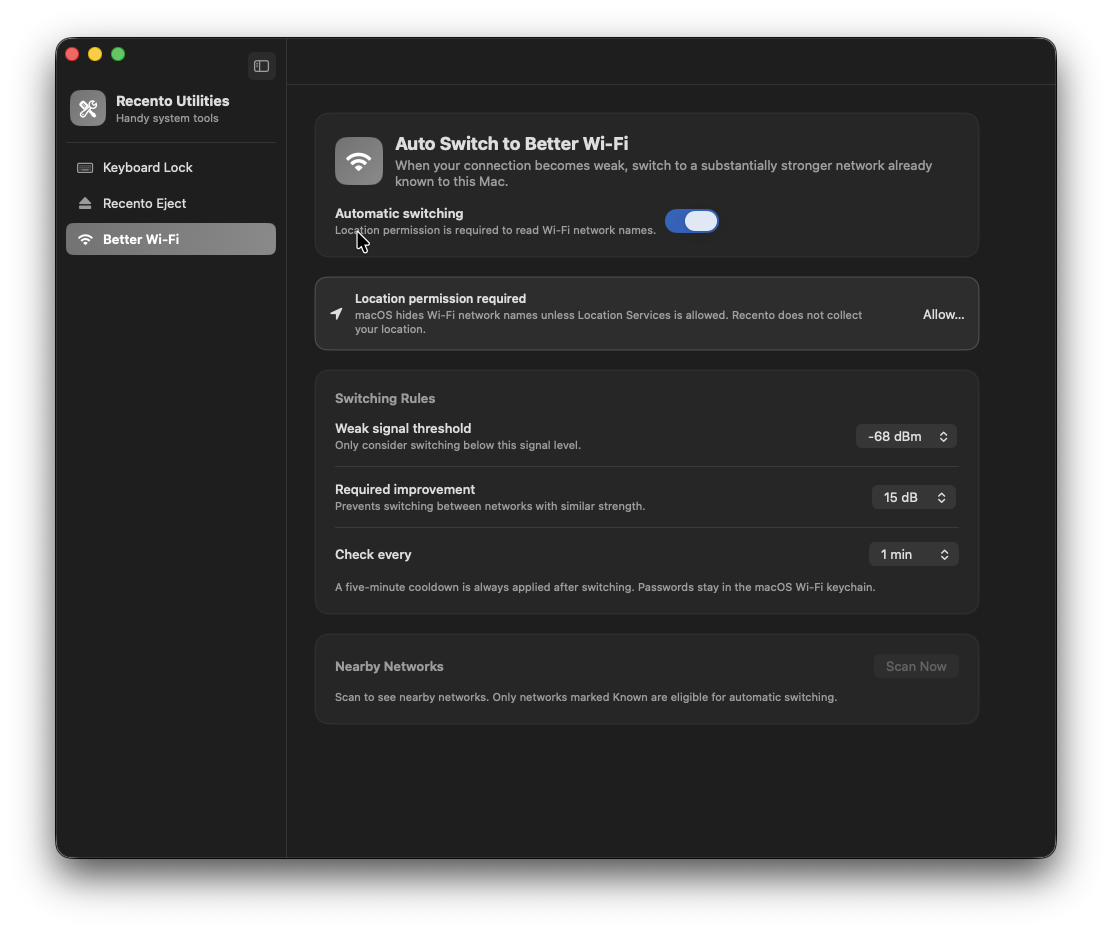
Better Wi-Fi lets your Mac auto switch to stronger Wi-Fi. When the signal drops below a level you choose, it checks the networks this Mac already knows, and if one is clearly stronger it offers to move you there, or does it straight away and tells you with a notification that quotes the signal numbers. It can also leave a network that has stopped reaching the internet. Better Wi-Fi is one of the tools in Recento Utilities, part of Recento Pro.
When your signal falls below your threshold, Better Wi-Fi looks for a network this Mac has joined before that is clearly stronger, and switches to it. You stop noticing dead spots instead of fighting them.
It only ever joins networks saved on this Mac, using the passwords macOS already keeps in its own keychain. Recento never sees or stores a Wi-Fi password.
A router with full bars and a dead connection looks perfect to a signal check. With this switch on, Better Wi-Fi notices when a network stops carrying traffic and moves you to another known network, even if its signal is weaker.
You decide how much stronger a network must be before a switch (10, 15 or 20 dB), and a five-minute cooldown follows every switch. Two networks of similar strength will not bounce you back and forth.
By default Recento suggests the switch and you say yes. Turn on Switch without asking and it moves you right away, then tells you with a notification naming both networks and their signal levels.
Nearby Networks lists what is in range with its signal strength in dBm and whether this Mac knows it. Switch History records the changes Recento made, the ones it suggested, and the ones you made yourself.
Save your home or office Wi-Fi as a place. If your MacBook has been on battery there for a few minutes, Recento suggests plugging in the charger, at most once a day per place.
| Feature | Free version | Recento Pro |
|---|---|---|
| Auto-switch & charging reminder | Included | Included |
Recento Pro costs $9.99 a month after a 2 day free trial (cancel any time) or $99 one time. Better Wi-Fi is free either way.
Plans, trial and refund terms are on the Recento Pro pricing section.
macOS tends to keep the network it is already on, even when a stronger one you have used before is nearby. Better Wi-Fi watches the signal and moves you to the stronger known network when yours drops below the level you set.
No. Better Wi-Fi only switches to networks saved on this Mac, the ones you have joined before. Networks you have never joined are listed as Not known and are never chosen.
macOS hides Wi-Fi network names from apps that are not allowed Location Services. Recento needs the names to tell networks apart. It does not collect or store your location.
Yes. With Leave networks with no internet on (the default), Recento notices when a network stops reaching the internet and moves you to another known network, even one with a weaker signal.
No. A switch needs a clear improvement in signal, 15 dB by default, and every switch is followed by a five-minute cooldown.
By default it suggests the switch and waits for you. Turn on Switch without asking to have it switch straight away, though macOS may still ask for a network's password the first time.
Save your home or office network as a place. When your Mac has been on battery on that network for a few minutes, you get a notification suggesting the charger, at most once a day per place. A network with the same name somewhere else counts as the same place.
Yes. Automatic switching and the charging reminder are both included in the free version of Recento Pro.
Download Recento Pro and let your Mac find the stronger network.


