Get back anything you copied
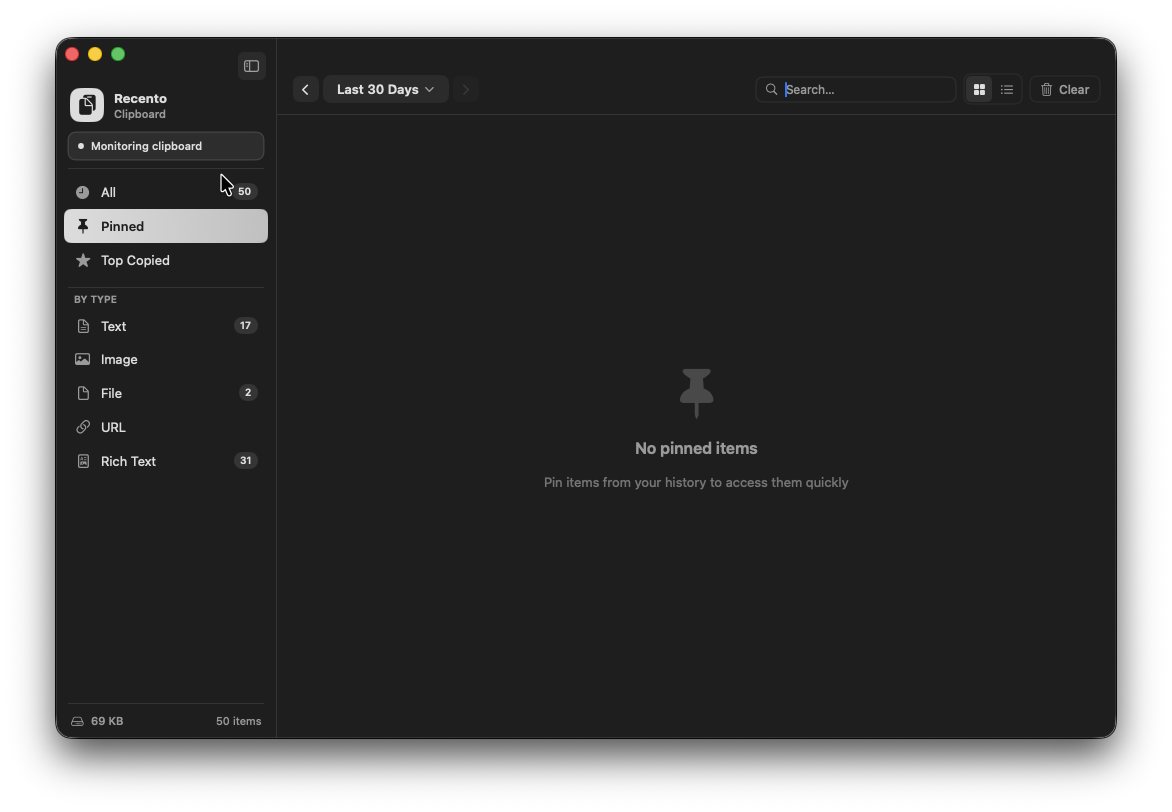
Every text snippet, image, link and file you copy is saved to a history you can scroll, filter by type or date, and search as you type. Copy the same thing again and it moves back to the top instead of appearing twice.
Recento Clipboard · Part of Recento Pro
Search your clipboard history, pin the clips you reuse and paste them straight into the app you were working in. Recento Clipboard is part of Recento Pro.
macOS 14 or later · Apple Silicon & Intel
Your Mac's clipboard holds one thing at a time. Copy a link, then copy an address, and the link is gone. Hours later you need it again and have to go and find it all over again.
Recento Clipboard is a clipboard manager for Mac that keeps a searchable history of the text, images, links and files you copy. Find any clip by typing a few letters, pin the ones you use every day, file them into collections, and paste them straight into the app you were in. Anything a password manager marks as secret is never recorded.
Every text snippet, image, link and file you copy is saved to a history you can scroll, filter by type or date, and search as you type. Copy the same thing again and it moves back to the top instead of appearing twice.
Pick a clip and Recento Clipboard pastes it into the app you were working in, so there is no switching back and pressing ⌘V yourself. Press ⌘⌥1 to ⌘⌥9 (and ⌘⌥0) to pick one of your most recent clips from the menu bar list.
Pin addresses, replies, code snippets and links you paste every week so they never scroll away. A Top Copied view shows the clips you reach for most.
Group clips by project or client in colour-coded collections. Drag a clip onto a collection in the sidebar, or right-click it and choose Add to Collection.
Switch a collection on and its clips appear on a Recento Drop shelf that floats above your other apps, ready to drag from. File a clip and it shows up there. Pictures become real image files you can drop into anything.
Passwords and anything else a password manager marks as concealed are never saved to your history, whether sync is on or off. You can also pause recording at any time and clear the history whenever you like, or every time Recento quits.
Turn on iCloud sync and anything you copy on another Mac shows up in your history here, with a badge showing which device it came from. You can filter the history by device too.
Your clipboard history is in the full Recento Clipboard window, in the Recents menu bar dropdown and in Recento Slide, a bar that slides up from the bottom of the screen in any app.
| Feature | Free version | Recento Pro |
|---|---|---|
| Clipboard history kept | 50 clips | Up to 2,000 clips |
| Search, pins, Top Copied & collections | Included | Included |
| Paste straight into any app | Included | Included |
| iCloud sync with iPhone & Macs | Not included | Included |
Recento Pro unlocks the paid features in every module for $9.99 a month after a 2 day free trial (cancel any time) or $99 once for a lifetime licence.
Plans, trial and refund terms are on the Recento Pro pricing section.
Recento Clipboard is coming to iPhone and iPad as a free app. It will show your Mac's clipboard history on your phone, and the clips you save on your phone will appear on your Mac with an iPhone badge. Syncing uses your own private iCloud account, so there is nothing to sign up for.
The Mac side of syncing is part of Recento Pro. The iPhone app is not on the App Store yet. This page will link to it when it is.
Your clipboard history is stored on your Mac. Anything a password manager marks as concealed is never recorded. With sync on, text, links, rich text and pictures up to 512 KB sync. Larger pictures and copied files stay on the Mac that copied them. Deleting a clip deletes it on your other devices and takes its contents back out of iCloud.
macOS keeps only the last thing you copied. Recento Clipboard adds a full, searchable history of the text, images, links and files you copy, so you can get back something you copied hours or days ago.
The free version keeps your 50 most recent clips. Recento Pro keeps up to 2,000. Pinned clips stay easy to find however long ago you copied them.
No. Password managers mark the passwords they copy as concealed, and Recento Clipboard never records anything marked that way. You can also pause recording at any time.
Yes. Pick a clip and it is pasted into the app you were in. This needs Accessibility permission, which macOS requires for any app that types into another one. Without it, the clip is copied and you press ⌘V.
Yes, with Recento Pro. Turn on iCloud sync on each Mac and clips copied on one appear on the other, marked with the device they came from. Sync happens when you copy something and when you open the app, not instantly in the background, so a clip from another device can take a moment to arrive.
Recento Clipboard is coming to iPhone and iPad as a free app that syncs with your Mac over iCloud. It is not on the App Store yet. Syncing on the Mac side is part of Recento Pro.
Text, links, rich text and pictures up to 512 KB sync. Larger pictures and copied files stay on the device that copied them, because a file path on one device means nothing on another.
No. The contents of each clip are stored in encrypted fields in your own private iCloud database, which neither Recento nor Apple can read. Recento has no server of its own.
Download Recento Pro and every clip you copy from now on is one search away.
 Recento Slideyour clipboard history and collections, one key away in any app.
 Recento Dropshow a clipboard collection on a floating shelf to drag from.
 Recents MenuBar Apprecent clips alongside your recent files in the menu bar.
 Copy PasteWindows-style ⌃C and ⌃V for people switching from a PC.
 Recento Snapcopy the text out of any screenshot.