
The AI file organizer and renamer for Mac.
FilesMagicAI v2 does two things, and does them properly. Magic Organizer reads your filenames and proposes a folder structure that matches how you actually work. Magic Rename reads what is inside your unclear downloads and renames them on-device, with no network calls at all. A system cleaner for duplicates, unused apps and caches is included free with both.
Privacy First: File and folder contents never leave your Mac. Magic Organizer sends filenames only, Magic Rename sends nothing.


From a Cluttered Mac to a Clean Auto Organized Mac
Clear the messy folders. Let AI propose order from filenames. Rename files locally with Magic Rename when you need better names. Then reclaim storage from duplicates, unused apps, and unwanted clutter with review built in.
Choose a folder
Start with Downloads, Desktop, project folders, or another working directory on your Mac.
Review the suggested structure
FilesMagic proposes a clearer folder structure based on the files you selected. You can review the structure before continuing.
Optionally run Magic Rename
Before organizing, you can preview rename suggestions for supported files. This is useful when filenames are vague, inconsistent, or unhelpful.
Apply only what you want
Exclude files or folders, skip renaming, or continue with the suggestions you approve.
System Cleaner
Use the cleanup tools to review duplicate files, unused apps, installers, caches, and development leftovers before deleting anything.
Experience the
magic of instant organization.
See how Files Magic AI transforms your messy folders into a beautifully organized system with just one click. Try it yourself free for 7 days on the yearly plan, or 3 days on monthly.


Automation for Mac files, with clear privacy boundaries.
FilesMagicAI v2 separates organization, offline renaming, and system cleaning so you can use only the automation you need. Folder organization uses filenames to suggest structure. Files AI agent chat supports BYOK OpenAI. Magic Rename reads file contents entirely on-device for content-aware names.
Organize files without sending file contents away.
Keeping a Mac organized still takes too much manual effort: sorting through files, moving items into folders, removing duplicates, renaming vague downloads, and clearing storage. FilesMagicAI v2 automates the repetitive parts while keeping the workflow reviewable.
- Only filenames are sent when AI creates an organization structure
- Optional BYOK OpenAI for Files AI agent chat, so requests use your own OpenAI account
- Your file contents and folder contents never leave your Mac
- Choose one folder, multiple working zones, or synced local folders
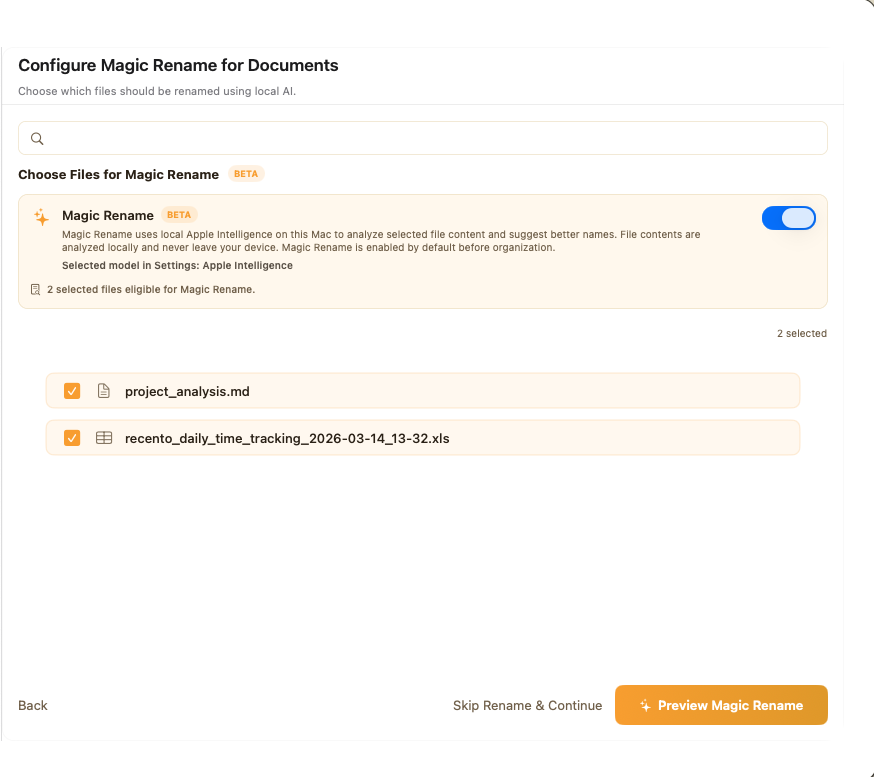
Files named from what is inside them, not guessed from patterns.
Magic Rename opens each file and reads it: the text of a PDF, the cells of a spreadsheet, the words inside a photo of a receipt. Scan_0043.pdf becomes 2026-03-14_Invoice_Acme-Studios.pdf. Everything runs on your Mac and nothing is uploaded.
- Reads file contents on-device, with OCR for scans and photos
- Three local engines: Apple Intelligence, a built-in model, or an optional Rename LLM
- Preview every change before it applies, undo any of it later
- Watch a folder and new files are renamed as they land
Get storage back from duplicates and unused apps.
The beta System Cleaner helps you find storage you can reclaim by reviewing unused apps, duplicate files, and cache-heavy leftovers before deleting anything.
- Find duplicate files before they compound
- Review unused apps and storage heavy downloads
- Surface node_modules, Xcode, Flutter, Gradle caches
- Delete only after review, never a blind wipe
Exclude Folder or Files Before Organization or Rename.
Automation only feels good when there's a visible way back. Preview changes, protect parts of the tree, and reverse recent actions when your first pass needs correcting.
- Preview organization before committing
- Exclude specific files and folders you want untouched
- Undo recent organization actions at any time
People who finally feel in control of their files.
- "
Four years of scanned receipts all called scan_0012.pdf. Magic Rename read each one and named it by vendor and date. One afternoon instead of the weekend I had set aside.
DBookkeeper, Austin, TX - "
My Downloads folder had just over 3,400 files in it. The folder plan it proposed was close enough that I moved two things by hand before approving the rest.
MReal estate agent, Charlotte, NC - "
Renaming on-device is why I bought it. These are client files, and I could confirm in Little Snitch that nothing left my MacBook Pro.
EFreelance paralegal, Portland, OR - "
It feels less like a cleaner and more like a reset button for the folders I avoid opening.
NIndie developer - "
The preview and undo flow is what sold me. I get the upside of automation without the panic.
MProduct designer - "
Finally a Mac utility that understands both creative clutter and developer junk in the same place.
JCreative technologist
Files Magic AI vs Sparkle vs Hazel
Three popular ways to tame a messy Mac: an AI organizer, a minimalist auto-sorter, and a rules engine. Here is how they line up.
| Feature | Files Magic AI | Sparkle | Hazel |
|---|---|---|---|
| Approach | AI proposes a structure, you approve | AI auto-sorts, set-and-forget | Manual rules you build |
| Setup to first result | ✓Minutes | ✓Minutes | ~Hours of rule building |
| AI file renaming (offline) | ✓Magic Rename reads file contents on-device | ✗No | ✗Pattern renaming only |
| Review + one-click undo | ✓Preview before anything moves | ✗No undo | ~Rules just run |
| System cleaner & duplicates | ✓Duplicates, unused apps, dev caches | ✗Not included | ✗App sweep only |
| Automatic scheduling | ✓Yes | ✓Yes | ✓Yes |
| Scripting & integrations | ✗Not a scripting tool | ✗No | ✓AppleScript, shell, tags |
| Privacy | ✓Filenames only; rename fully offline | ~Varies by feature | ✓100% local |
| Pricing | $4.99/mo · $29/yr · $49.99 lifetime · 7-day trial yearly, 3-day monthly | Subscription (Every bundle) | $42 one-time |
Want the full breakdown? Read Files Magic AI vs Sparkle and Files Magic AI vs Hazel.
Choose Your Plan
Pick a plan to unlock FilesMagic AI, or sign in to restore an existing purchase.
Monthly includes a 3 day free trial, then 50% off your first month. Yearly includes a 7 day free trial.
- ✓Full AI Access
- ✓Unlimited Organizations
- ✓Unlimited Custom Folders
- ✓Magic Rename Feature (Local AI)
- ✓Magic Rename using Cloud
- ✓System Cleaner
- ✓Cloud Folder Support
- ✓Cancel Anytime
Questions that matter before software touches your files.