Files Magic AI · Magic Rename

Your files, finally named like a human named them.

Magic Rename reads what is actually inside your documents, the invoice number, the sender, the date on the page, and gives every file a name you can recognize at a glance. It runs entirely on your Mac. Nothing is uploaded.

Scan_0043.pdf
2026-03-14_Invoice_Acme-Studios.pdf
IMG_2891.HEIC
2026-02-02_Delta-Airlines_Receipt_412.heic

Part of Files Magic AI · On-device · Works offline

Every download folder ends the same way: Scan_0043.pdf, document(3).pdf, IMG_2891.HEIC, final_v2_FINAL.docx. You cannot search files you cannot name, so you open them one by one to find the one you need.

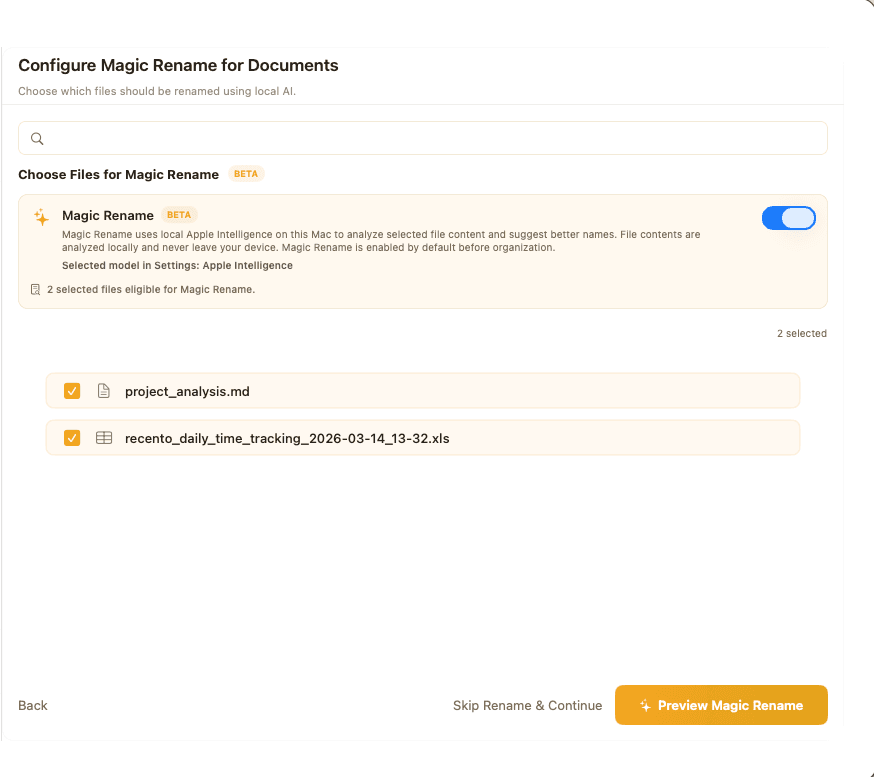
Magic Rename in Files Magic AI showing a batch rename preview with old and new filenames

Choose the engine that suits your Mac

If Apple Intelligence is not available on your Mac, Magic Rename does not nag or degrade. It uses a built-in model instead. On large batches, where Apple's system model is slower, the app tells you and offers to switch.

Apple Intelligence

Macs on macOS 26 or later with Apple Intelligence enabled. Uses the system model already on your Mac.

English Built-In Model

Ships with the app. No download, no setup, works on every supported Mac.

Rename LLM

An optional download for stronger results and non-English documents.

Template mode: exact, repeatable naming

When you need every file named the same way, describe the shape once:

{date}_{vendor}_{invoice}_{amount}
2026-03-14_Acme-Studios_INV-2291_1450.pdf

Seven built-in templates cover the common paperwork, fourteen fields are available (date, document type, title, issuer, vendor, recipient, reference number, invoice number, amount, and more), and you can save your own templates and reuse them.

General Documents{date}_{document_type}_{title}
Business Documents{doc_date}_{doc_type}_{issuer_name}_{recipient_name}
Invoices{date}_{vendor}_{invoice}_{amount}
Receipts{date}_{issuer}_{document_type}_{amount}
Statements{date}_{issuer}_{recipient}_{document_type}
Contracts & Agreements{date}_{document_type}_{issuer}_{recipient}
Certificates{date}_{document_type}_{recipient}_{issuer}

Built to be trusted with 500 files at once

It reads the file, not just the filename

Most renaming tools shuffle the characters you already have. Magic Rename opens the document and reads it: the text of a PDF, the cells of a spreadsheet, the slides of a deck, the words inside a photo of a receipt. The new name comes from the content, which is why it can tell an invoice from a statement from a contract when all three arrived as Scan_0043.pdf. Scanned pages and photos are read with on-device OCR, so a picture of a receipt is renamed as accurately as a text PDF.

Nothing leaves your Mac

The rename pipeline makes no network calls at all. Reading, understanding, and naming all happen locally, using an on-device model. That matters here more than in most apps: renaming by content means the app reads your invoices, contracts, and bank statements. Those are exactly the documents you would not paste into a chatbot. With Magic Rename the question never comes up. The file never leaves the machine, so there is no server log, no retention window, and no account to trust. It works fully offline, on a plane or behind a corporate firewall.

Auto mode: no setup, no syntax

Pick files. Press rename. Auto mode chooses a sensible name for each file on its own, with no pattern to learn and no tokens to type. It is the mode most people never need to leave.

Review before anything changes

Magic Rename never renames behind your back. Every file is shown as old name next to new name before a single one is applied, so you approve the batch, not a promise. Naming conflicts are flagged in the preview rather than discovered afterwards.

One-click undo, for months

Every rename is recorded with the original name. Undo a single file or an entire batch whenever you notice. The history holds up to 2,000 renames, and undo still finds the file if you have since moved it.

Watch a folder and let it run

Point Magic Rename at Downloads or a scanner's output folder, pick a template, and leave it. New files are renamed as they land, and the app waits until a file has finished downloading before touching it. Anything it is not confident about is set aside for you to review instead of being guessed at.

Drop files anywhere on the page

Drag one file or a whole folder anywhere onto the Magic Rename page. No target rectangle to hit.

Tells you when it is done

Start a large batch, switch to something else, and macOS notifies you when it finishes. No window-watching.

Classic batch rules, when that is all you need

Sometimes you do not need AI, you need to strip a prefix off 300 files. Find and replace, sequential numbering, add text at the start, end, or a chosen position, change case, and remove characters, all with the same preview and the same undo.

Supported files

Documents
PDF, Word (.doc, .docx), RTF, RTFD, OpenDocument text (.odt), EPUB
Spreadsheets
Excel (.xls, .xlsx), CSV, TSV, OpenDocument (.ods)
Presentations
PowerPoint (.ppt, .pptx), OpenDocument (.odp)
Images
PNG, JPG, JPEG, HEIC, TIFF, BMP, WebP (read with OCR)
Text and markup
TXT, MD, HTML, JSON, XML, YAML, TOML, INI, CONF, LOG

How it works

  1. 01

    Drop in files or a folder

    One file or a few hundred.

  2. 02

    Pick Auto or a template

    Auto decides for you; a template names everything the same way.

  3. 03

    Review the preview

    Old name beside new name, conflicts flagged.

  4. 04

    Apply

    Or undo later. The originals are remembered either way.

Frequently asked questions

Are my documents uploaded anywhere?

No. The rename pipeline makes no network requests. Reading and naming happen on your Mac, using a model that runs locally.

Do I need Apple Intelligence?

No. Magic Rename ships with a built-in model that works without it. If your Mac runs macOS 26 or later with Apple Intelligence enabled, you can use that instead, and an optional Rename LLM download handles non-English documents.

Does it work offline?

Yes, completely.

What if I don't like a name?

Nothing is applied until you approve the preview, and every rename can be undone afterwards, one file or a whole batch.

Can it read scanned documents and photos?

Yes. Images and scanned PDFs are read with on-device OCR.

Does it work in languages other than English?

Yes, via the optional Rename LLM model, or Apple Intelligence in the languages Apple supports.

Can I keep my own naming convention?

Yes. Build a template from the available fields, save it, and reuse it, or set it as the rule for a watched folder.

Stop opening files to find out what they are.

Magic Rename is included in Files Magic AI, along with AI folder organization and the System Cleaner.