
The AI file organizer and renamer for Mac.
Magic Organize reads your filenames, proposes a folder structure from a template you pick, and shows you the result before anything moves. Magic Rename reads what is inside your unclear files and gives them clean names, one at a time, across a whole folder, or automatically as new files arrive. System Cleaner finds duplicates, unused apps, old node_modules folders and developer caches.
Privacy first: Magic Organize sends filenames only. Magic Rename can run entirely on your Mac, or use Cloud AI when you choose it. Your folders are never uploaded.


From a cluttered Mac to a clean, auto-organized Mac
Clear the messy folders. Pick a template and preview the structure. Rename files from what is inside them, and undo it all if you change your mind. Then reclaim storage from duplicates, unused apps and developer leftovers, with review built in.
Choose a folder
Start with Downloads, Desktop, a project folder, or any working directory on your Mac.
Pick a template
Choose how the folder should be organized. Each template shows the folders it will roughly create, based on your own files.
Preview and edit the structure
See exactly which files go to which folder. Rename a folder or remove one from the plan before continuing.
Choose what to include
Exclude files or folders you want left alone, then organize in one click.
Rename when names are unclear
Run Smart Rename on a handful of files, Batch Rename on a whole folder, or let a Magic Folder name new files as they arrive.
Undo anytime
Revert a move, or use Revert to Original to take a renamed file back to the name it started with.
System Cleaner
Review duplicates, unused apps, installers, caches and development leftovers before deleting anything.
Experience the
magic of instant organization.
See how Files Magic AI turns a messy folder into an organized one with a single click. Try it free for 3 days on either plan.


Automation for Mac files, with clear privacy boundaries.
Files Magic AI keeps organizing, renaming and cleaning separate, so you use only the automation you need. Organizing uses filenames to suggest structure. Magic Rename reads file contents, on your Mac or through Cloud AI, whichever engine you pick. Files AI agent chat can run on your own OpenAI key.
Organize files without sending file contents away.
Keeping a Mac tidy takes too much manual work: sorting, moving, de-duplicating, renaming and clearing space. Files Magic AI automates the repetitive parts and keeps every step reviewable.
- Pick a template, then preview and edit the folder plan before anything moves
- Only filenames are sent when AI builds an organization structure
- Optional bring-your-own OpenAI key for the Files AI agent chat, so requests use your own account
- Your file contents never leave your Mac for organizing
- Works on one folder, several working folders, or synced local folders
- Auto-organize keeps chosen folders tidy in the background, with status in the menu bar
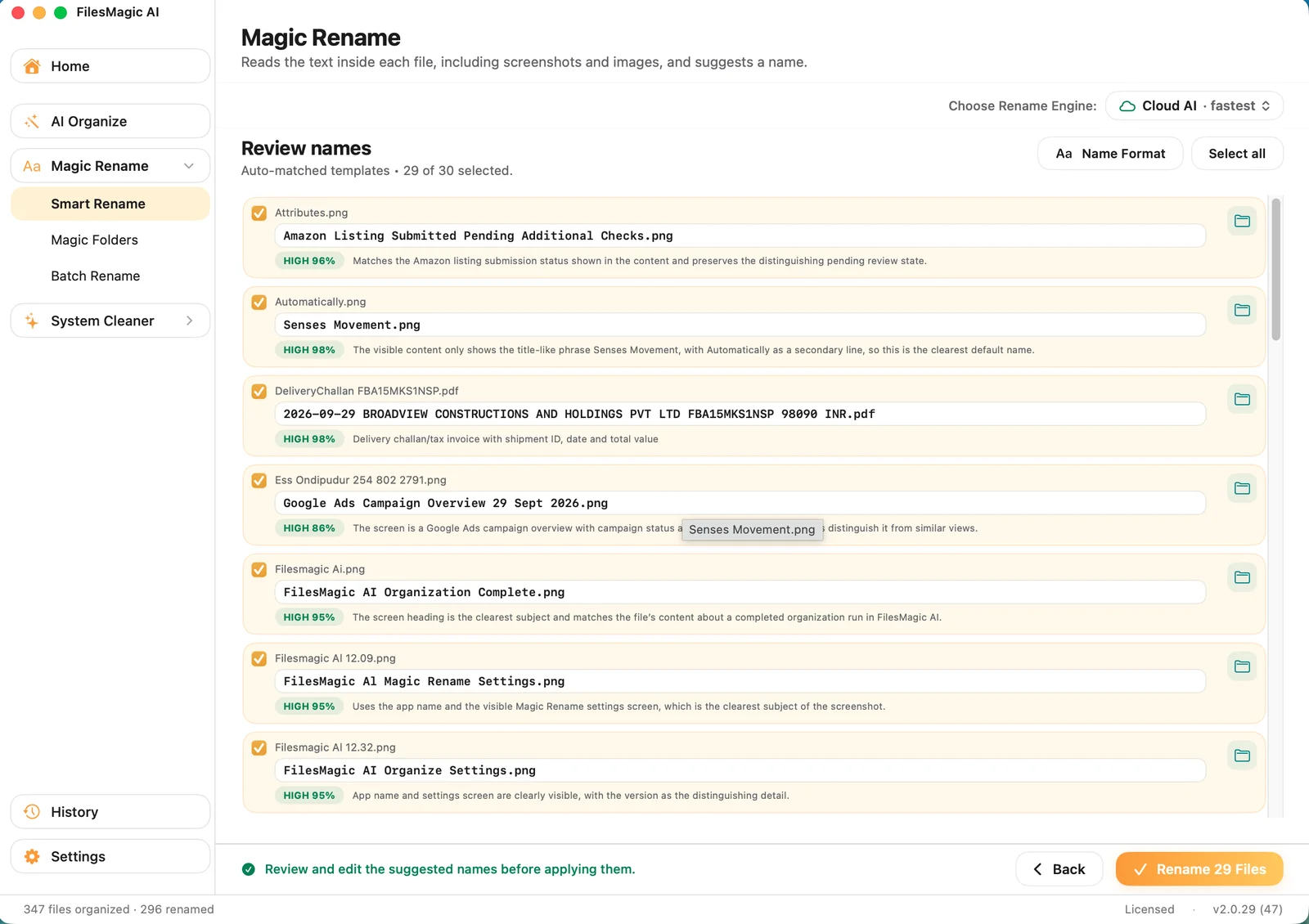
Files named from what is inside them, not guessed from patterns.
Magic Rename opens each file and reads it: the text of a PDF, the cells of a spreadsheet, the words in a photo of a receipt. Scan_0043.pdf becomes 2026-03-14_Invoice_Acme-Studios.pdf. Smart Rename handles one-off files, Batch Rename runs rules across a whole folder, and Magic Folders name new files as they land.
- Reads file contents, with OCR for scans and photos
- Choose your engine: on-device (Apple Intelligence or a built-in model, fully offline) or Cloud AI
- Naming templates and custom fields, so names follow your own convention
- Preview every change before it applies
- Files that cannot be read, such as QuickTime video, are listed and marked "Not supported" rather than silently skipped
- Revert to Original puts any renamed file back to its first name, from the result screen, History or a Magic Folder
Get storage back from duplicates and unused apps.
System Cleaner finds storage you can reclaim and shows it to you before anything is deleted.
- Find duplicate files before they pile up
- Review unused apps and storage-heavy downloads
- Surface node_modules, Xcode, Flutter and Gradle caches
- A restore note (Recreate node_modules.txt) lists the package-manager commands to rebuild a deleted project
- Delete only after review, never a blind wipe
Exclude Folder or Files Before Organization or Rename.
Automation only feels good when there is a visible way back. Preview changes, protect parts of the tree, and reverse recent actions when your first pass needs correcting.
- Preview organization before committing
- Exclude specific files and folders you want untouched
- Undo recent organization actions
- Revert renames one by one, per run, or all the way to the original name
- Rename history is kept for 30 days
People who finally feel in control of their files.
- "
Four years of scanned receipts all called scan_0012.pdf. Magic Rename read each one and named it by vendor and date. One afternoon instead of the weekend I had set aside.
DBookkeeper, Austin, TX - "
My Downloads folder had just over 3,400 files in it. The folder plan it proposed was close enough that I moved two things by hand before approving the rest.
MReal estate agent, Charlotte, NC - "
Renaming on-device is why I bought it. These are client files, and I could confirm in Little Snitch that nothing left my MacBook Pro.
EFreelance paralegal, Portland, OR - "
It feels less like a cleaner and more like a reset button for the folders I avoid opening.
NIndie developer - "
The preview and undo flow is what sold me. I get the upside of automation without the panic.
MProduct designer - "
Finally a Mac utility that understands both creative clutter and developer junk in the same place.
JCreative technologist
Files Magic AI vs Sparkle vs Hazel
Three popular ways to tame a messy Mac: an AI organizer, a minimalist auto-sorter, and a rules engine. Here is how they line up.
| Feature | Files Magic AI | Sparkle | Hazel |
|---|---|---|---|
| Approach | You pick a template, AI proposes a structure, you edit and approve | AI auto-sorts, set-and-forget | Manual rules you build |
| Setup to first result | ✓Minutes | ✓Minutes | ~Hours of rule building |
| AI file renaming | ✓Reads file contents; on-device or Cloud AI | ✗No | ✗Pattern renaming only |
| Bulk and automatic renaming | ✓Batch Rename rules and Magic Folders | ✗No | ~Rules only |
| Review + one-click undo | ✓Preview before anything moves; undo and Revert to Original | ✗No undo | ~Rules just run |
| System cleaner & duplicates | ✓Duplicates, unused apps, dev caches | ✗Not included | ✗App sweep only |
| Automatic scheduling | ✓Yes | ✓Yes | ✓Yes |
| Scripting & integrations | ✗Not a scripting tool | ✗No | ✓AppleScript, shell, tags |
| Privacy | ✓Organizing sends filenames only; rename can run fully offline | ~Varies by feature | ✓100% local |
| Pricing | Free plan · $4.99/mo · $34.99/yr · $59.99 lifetime | Subscription only, from $9.25/month | $42 one-time |
Competitor prices were read from each vendor's own pricing page on 10 October 2026. They change, so check before you buy.
Want the full breakdown? Read Files Magic AI vs Sparkle and Files Magic AI vs Hazel.
Choose your plan
Pick a plan to unlock Files Magic AI, or sign in to restore an existing purchase.
Monthly and yearly both include a 3-day free trial. Monthly also takes 50% off your first month.
- ✓Organize one folder of your choice
- ✓25 Smart Renames in total
- ✓Upgrade any time from the Upgrade button in the app
- ✓Full AI Access
- ✓Unlimited Organizations
- ✓Unlimited Custom Folders
- ✓Magic Rename Feature (Local AI)
- ✓Magic Rename using Cloud
- ✓Rules Based Batch Rename
- ✓System Cleaner
- ✓Cloud Folder Support
- ✓Cancel Anytime
- ✓Full AI Access
- ✓Unlimited Organizations
- ✓Unlimited Custom Folders
- ✓Magic Rename Feature (Local AI)
- ✓Magic Rename using Cloud
- ✓Rules Based Batch Rename
- ✓System Cleaner
- ✓Cloud Folder Support
- ✓Cancel Anytime
- ✓Forever yours, one payment
- ✓Unlimited AI Organize, any number of folders
- ✓Preview and edit the folder plan before it runs
- ✓Smart Rename: 1,000 Cloud AI renames a month
- ✓Unlimited renames on local AI models
- ✓Rules Based Batch Rename
- ✓System Cleaner
- ✓Cloud folder support
- ✓All future updates, early access, priority support
Questions that matter before software touches your files.