
Unlock Peak Productivity: How Files Magic AI Transforms Your Digital Workflow
Tired of digital clutter? Discover the AI-powered solution that brings order to your files and peace to your mind.
In today's digital age, managing an ever-growing mountain of files can feel like a losing battle. From important documents and cherished photos to project files and downloads, keeping everything organized is a constant challenge. This digital disarray doesn't just waste time; it drains mental energy and hampers productivity. But what if there was a smarter way? What if you could achieve "Tidy Files, Clear Mind" with minimal effort?
Introducing Files Magic AI, your revolutionary AI-powered file organizer designed to bring effortless order to your digital life while fiercely protecting your privacy.
New in v2
Magic Rename Reads What Is Inside Your Files
Most renaming tools shuffle characters you already have. If the filename is Scan_0043.pdf there is nothing in it to shuffle. Magic Rename opens the document instead and builds the name out of what is inside, so Scan_0043.pdf ends up called 2026-03-14_Invoice_Acme-Studios.pdf.
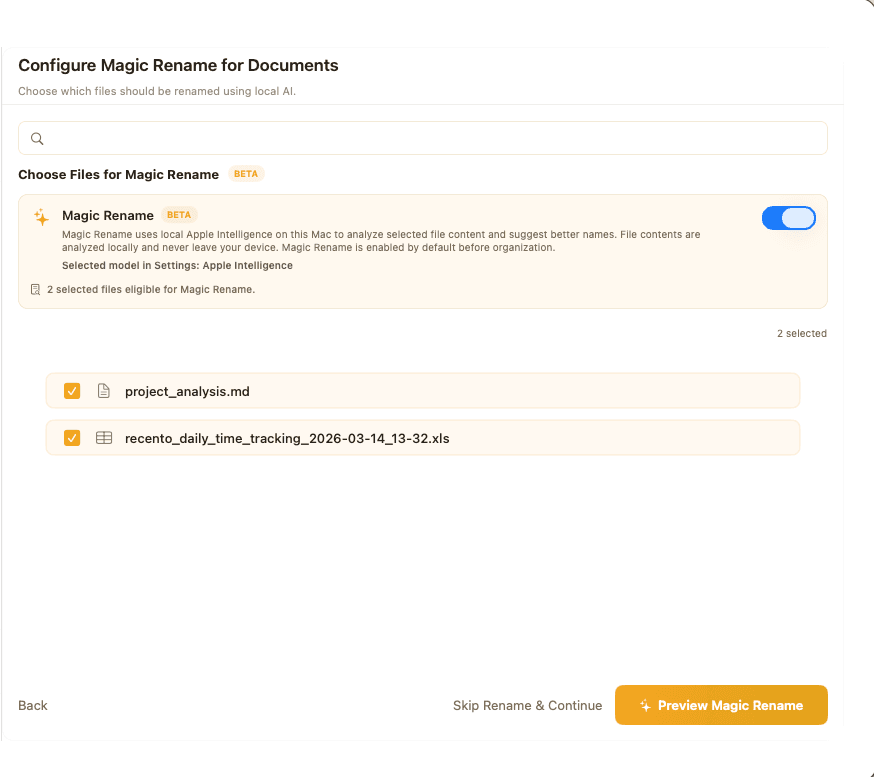
It opens the file and reads it
The text of a PDF, the cells of a spreadsheet, the slides of a deck, the words inside a photo of a receipt. That is how it tells an invoice from a bank statement from a contract when all three arrived as Scan_0043.pdf. Scans and photos go through on-device OCR, so a phone picture of a receipt is named as accurately as a text PDF.
Nothing leaves your Mac
The rename pipeline makes no network requests. Reading, understanding and naming all run locally. That matters more here than in most apps, because renaming by content means the app reads your invoices and bank statements. There is no server log, no retention window and no account to trust. It works on a plane and behind a corporate firewall.
Auto mode needs no setup
Pick files, press rename. Auto mode chooses a name for each file with no pattern to learn and no tokens to type. Most people never leave it.
Three local engines
Apple Intelligence on macOS 26 or later, an English model built into the app that runs on every supported Mac, or an optional Rename LLM download for stronger results and non-English documents.
You approve the batch, not a promise
Every file appears as old name beside new name before anything is applied. Naming conflicts are flagged in that preview instead of discovered afterwards.
Undo holds 2,000 renames
Each rename is recorded with its original name. Undo one file or a whole batch weeks later, and undo still finds the file if you have moved it since.
Watch a folder and walk away
Point it at Downloads or a scanner output folder, pick a template, and new files are renamed as they land. It waits until a download has finished before touching the file, and sets aside anything it is not confident about for you to review.
Classic batch rules are still there
Sometimes you need to strip a prefix off 300 files rather than think about content. Find and replace, sequential numbering, add text at the start, end or a chosen position, change case, remove characters. Same preview, same undo.
Templates That Ship With the App
- General documents
- {date}_{document_type}_{title}
- Business documents
- {doc_date}_{doc_type}_{issuer_name}_{recipient_name}
- Invoices
- {date}_{vendor}_{invoice}_{amount}
- Receipts
- {date}_{issuer}_{document_type}_{amount}
- Statements
- {date}_{issuer}_{recipient}_{document_type}
- Contracts and agreements
- {date}_{document_type}_{issuer}_{recipient}
- Certificates
- {date}_{document_type}_{recipient}_{issuer}
Build your own from the available fields, save it, and set it as the rule for a watched folder.
Everything Magic Rename Can Read
- Documents
- PDF, Word (.doc, .docx), RTF, RTFD, OpenDocument text (.odt), EPUB
- Spreadsheets
- Excel (.xls, .xlsx), CSV, TSV, OpenDocument (.ods)
- Presentations
- PowerPoint (.ppt, .pptx), OpenDocument (.odp)
- Images
- PNG, JPG, JPEG, HEIC, TIFF, BMP, WebP, all read with OCR
- Text and markup
- TXT, MD, HTML, JSON, XML, YAML, TOML, INI, CONF, LOG
The Hidden Costs of a Messy Digital Workspace
We've all been there: frantically searching for a specific file buried under layers of ambiguously named folders, or struggling with version control for critical documents. This isn't just an inconvenience; it's a significant drain on your resources.
- Lost Time: Hours spent searching for files could be spent on more valuable tasks.
- Reduced Focus: A cluttered digital environment leads to a cluttered mind, making it harder to concentrate.
- Increased Stress: The anxiety of not finding what you need when you need it can be overwhelming.
No more endless sorting or the fear of losing files. It's time to reclaim your time and focus.
Meet Your Personal File Wizard: Files Magic AI ✨
Files Magic AI is not just another file utility; it's an intelligent assistant that learns your preferences and organizes your files with remarkable precision. Imagine transforming your messy folders into a beautifully structured system with just one click. That's the power of Files Magic AI.
Our AI operates locally on your device, using only file names to categorize and sort your documents, images, and more. This means your files are never uploaded, and your data remains completely private.
Why Choose Files Magic AI? Your Data, Your Control.
Smart, Intuitive Organization
Let our AI take the reins. Experience the relief of instant organization as Files Magic AI intelligently sorts your files based on their names and types, creating a logical and easy-to-navigate structure.
Uncompromising Privacy 🔒
Your security is paramount. Your file and folder contents never leave your Mac. We guarantee:
- No Content Uploads: Your file contents are never uploaded. Magic Rename reads them on your Mac only.
- No Data Sharing: Filenames are sent only to propose a folder structure. They are never sold or shared.
- Offline Renaming: Magic Rename makes no network calls at all. It runs entirely on your device.
Save Time, Reduce Stress
"Save it once. Let Files Magic AI handle the rest." Stop wasting precious time on manual sorting and focus on what truly matters. Enjoy the peace of mind that comes with an organized digital life.
Designed for macOS Users
Seamlessly integrated into your macOS environment, Files Magic AI offers a native, intuitive experience that feels right at home on your Mac.
Organize With a Preview, an Exclusion List, and Undo
Automation only feels good when there is a visible way back. The organizer proposes a folder layout from your filenames and shows you the whole thing before a single file moves.
Preview before anything moves
The proposed folder structure is shown in full first. Read it, then approve it.
An exclusion list that is respected
Mark files or folders you want left alone and no pass will touch them.
Undo recent organization
Reverse a run when the first pass needs correcting.
One folder or several
Run it on a single directory, several working zones, or a custom set of folders you define.
Cloud folders count
iCloud Drive, Dropbox and Google Drive folders organize like any other, as long as they are available locally on the Mac.
System Cleaner, beta
Storage You Forgot You Were Paying For
The cleaner looks for the clutter that accumulates without anyone deciding to keep it: duplicate files, apps you installed once, DMG installers from two years ago, and the build caches every developer machine collects. It lists what it found with sizes. You pick, then it deletes. It never sweeps on its own.
Files AI Chat Runs on Your Own OpenAI Key
The Files AI agent answers questions about what is on your Mac and can carry out organizing work you describe in words. It supports bring your own key: paste an OpenAI API key and every request runs through your account, on your billing, under your own data settings rather than ours.
What You Need to Run It
macOS 12 Monterey or later, on Apple Silicon or Intel. The Apple Intelligence rename engine needs macOS 26 or later, though the app ships with an English model that works without it. Non-English renaming uses the optional Rename LLM download, or Apple Intelligence in the languages Apple supports. The trial runs 7 days with full access and takes no card.
Ready to Experience the Magic?
Stop letting file chaos control your life. Take the first step towards a more organized, productive, and stress-free digital experience with Files Magic AI.
No credit card required for Trial. Full privacy guaranteed.
Is FilesMagic AI Right for You?
Wondering how FilesMagic AI stacks up against the competition? Check out our deep-dive comparison guide where we analyze FilesMagic AI vs. MakeItSparkle to help you decide which tool fits your workflow better.
Read the Comparison Guide →Your Journey to Digital Serenity Starts Now
Files Magic AI is more than just software; it's a commitment to a more organized, efficient, and private digital experience. Say goodbye to clutter and hello to clarity. Embrace the future of file management and let Files Magic AI work its wonders for you.
Have questions? Visit our FAQ section or contact our support team. We're here to help you make the most of Files Magic AI.